


How to Update Old Blog Posts for SEO (2026)
You published a post two years ago. It ranked, it brought in clicks, and then it slid down the results page. Now it sits around position 12, and nobody reads page two.
Here is the short answer. To update old content for SEO, record the post's Search Console baseline, compare it against the live search results, fix the intent and content gaps, refresh the title, meta description, links and facts, then republish at the same URL, request indexing and track the result. It is a method, not a guarantee.
Short answer: how to update an old blog post so it regains rankings
I have refreshed a lot of posts, and the ones that recover share one habit. We decide edits from evidence, not hunches. The seven steps at a glance:
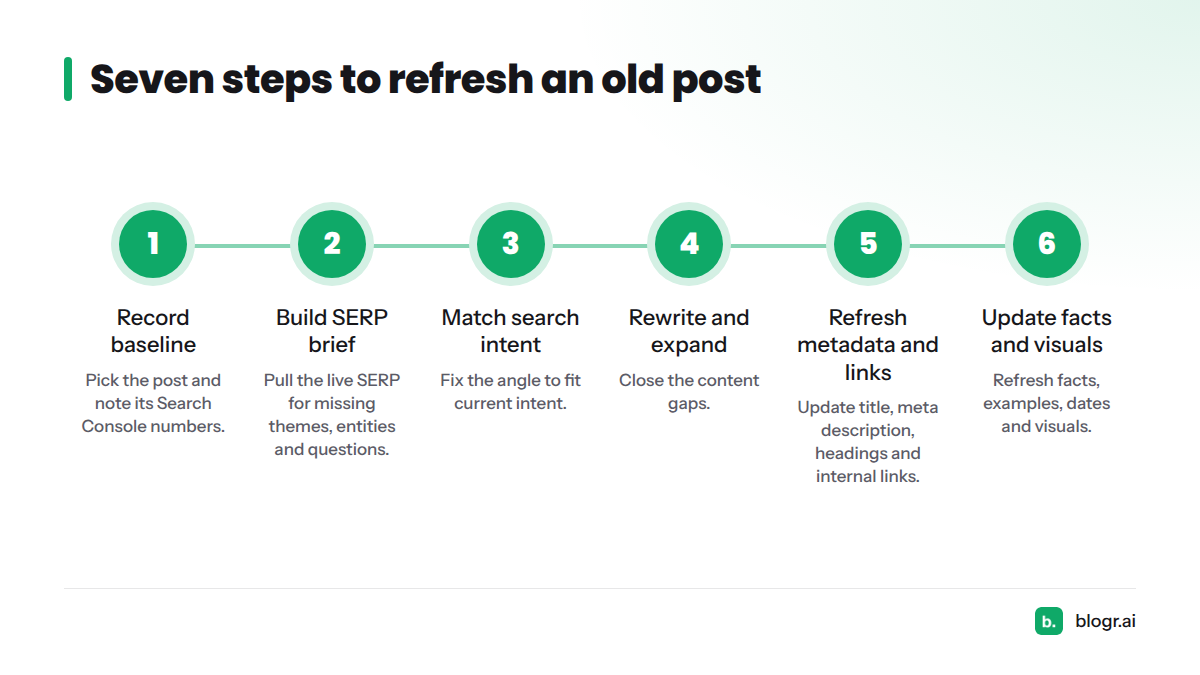
- Pick the post and record its baseline in Search Console.
- Pull the live SERP and build a brief of missing themes, entities and questions.
- Match the post to current search intent and fix the angle.
- Rewrite and expand the content to close the gaps.
- Refresh the title, meta description, headings and internal links.
- Update facts, examples, dates and visuals.
- Republish, request indexing and track the result.
What counts as a refresh? A content refresh is a planned update to an existing page that improves its accuracy, depth, intent match and metadata while keeping the same URL. It usually targets content decay, the gradual loss of rankings and clicks as results and searcher needs change. To spot decay first, read how to find posts suffering content decay.
A fair warning. On r/bigseo, practitioners debate whether updating old posts helps at all. That skepticism is healthy. Nobody controls Google's rankings, so treat each refresh as a tested change you measure, not a promise.
Step 1: Pick the post and record its baseline in Search Console
Editing without a baseline means you can never say whether the update worked. Start here.
Choose a post worth updating
Look for a post that still fits your business, already earns impressions, and sits off page one. Posts in the middle of the results are often the cheapest wins, because Google already considers them relevant. Our guide to striking distance keywords shows how to shortlist them. If a topic no longer matches what you sell, leave it alone. Not every old post deserves effort.
Record baseline clicks, impressions, CTR and average position
Open the Performance report in Google Search Console, filter by the page URL, and set the date range to the last 28 days. Save four numbers. If the report is new to you, here is how to read Google Search Console data. You can also pull the same data with our Search Console SEO tool.
| Metric | Baseline (before) | After 4 weeks | After 8 weeks |
|---|---|---|---|
| Clicks | |||
| Impressions | |||
| CTR | |||
| Average position |
Copy this table into a spreadsheet now. You will fill the other columns in Step 7.
Step 2: Pull the live SERP and build a brief of missing themes, entities and questions
Most guides skip this step, and it is where a refresh stops being guesswork. Search your target keyword in a private window and study what ranks today.
What to extract from the top results
Open the top five to seven pages and note:
- Shared headings: sections that most pages include and yours lacks.
- Entities: the tools, people, standards and concepts they name repeatedly.
- Formats: lists, tables, step-by-step guides, videos or comparison pages.
- Depth: how much they cover and which examples they use.
Find unanswered questions
Scroll to the People Also Ask box and the related searches at the bottom. Each question your post does not answer is a concrete addition. Write them down.
Here is a mini brief for a post targeting "best crm for startups":
| Brief section | Example entries |
|---|---|
| Missing themes | Pricing by team size, migration from spreadsheets |
| Missing entities | HubSpot, Pipedrive, Salesforce, free-tier limits |
| Unanswered questions | "Do startups need a CRM at all?", "What is the cheapest CRM that scales?" |
That gives you a content brief built from the live results, not from a generic checklist.
Step 3: Match the post to current search intent and fix the angle
Intent shifts. A query that once wanted a long explainer may now return comparison pages, or the reverse.
Check the intent and format that ranks now
Look at the top results and ask what the searcher wants: to learn, to compare, or to buy. Then check whether your post delivers that in the same format. If every top result is a ranked comparison and yours is a definition essay, no amount of polishing will close that gap.
Reposition the angle without changing the URL
Change the framing, headline promise and opening, but keep the address. The URL carries your accumulated links and history. Changing it means a redirect and added risk for no gain.
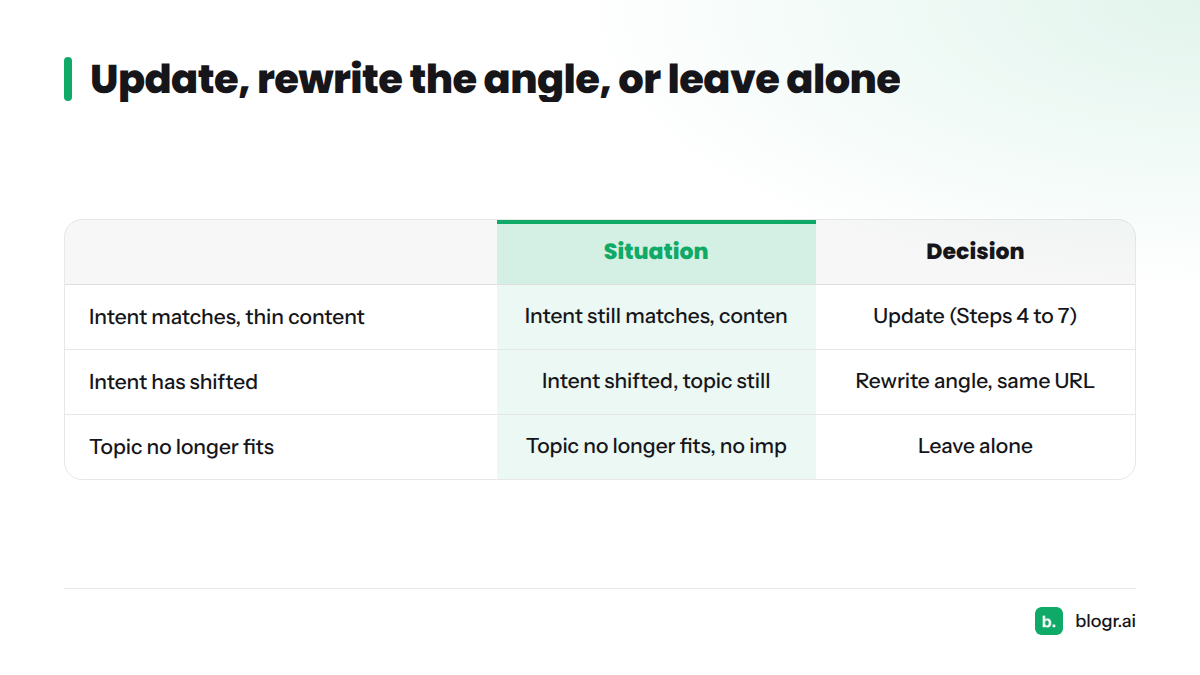
| Situation | Decision |
|---|---|
| Intent still matches, content is thin or dated | Update (Steps 4 to 7) |
| Intent shifted, topic still fits your business | Rewrite the angle, same URL |
| Topic no longer fits, no impressions | Leave alone |
Step 4: Rewrite and expand the content to close the gaps
Keep what already ranks, cut what is outdated
Before deleting anything, check which sections and queries bring impressions, and keep those intact. Remove claims, tools and screenshots that are no longer true. Gutting a winning section is the most common way a refresh backfires.
Add missing subtopics, entities and an FAQ
Work through the brief from Step 2. Add a section for each missing theme, name the entities a reader would expect, and answer each People Also Ask question in two to four plain sentences. A short FAQ at the end works well for this. Google's own guidance on helpful, people-first content makes a good test for every addition: does it serve the reader, or only the keyword?
Put the answer first
Open with a direct answer in the first sentences, then expand. Readers get what they came for, and search features can lift a clear answer more easily.
Step 5: Refresh the title, meta description, headings and internal links
Title tag and meta description
Rewrite both to match the sharpened angle. Google explains how title links and snippets are generated, and it may rewrite yours, so write them for people. Preview the result with our SERP snippet preview.
| Before | After | |
|---|---|---|
| Title | CRM Guide for Small Companies | Best CRM for Startups (2026): 7 Tools Compared by Price |
| Meta | Learn about CRMs and how they help your business. | Compare seven startup CRMs by price, free tiers and setup time, then pick one in ten minutes. |
If clicks lag behind impressions, see why you can rank but get no clicks and how to fix CTR gaps.
Headings
Make each H2 describe what the section delivers, and add headings for the new themes from your brief. Do not force the keyword into every heading. Write for scanning.
Internal links to and from the post
Link from the refreshed post to two or three related pages, and add links from relevant newer posts back to it. Use descriptive anchor text, not "click here". For a founder-friendly overview, see on-page SEO without an SEO team. Watch for cannibalization too. If two of your posts target the same query, link them with clear roles instead of letting them compete.
Step 6: Update facts, examples, dates and visuals
Replace stale stats, tools and screenshots
Check every number, tool name, price and screenshot. Replace anything outdated, add a source for each statistic, and fix broken links. A 2026 reader who sees a 2021 screenshot stops trusting the rest.
Should you update the publish date?
If you are asking "should I update publish date?", the answer is yes, but only after a real change. Show an honest "last updated" date. Google's documentation on dates in search results says to show a visible date and to use structured data, and it warns against manipulating dates. Changing a date alone is not a ranking lever, so skip fake freshness. Keep the original publish date visible if your theme allows it, and make sure the Article schema dateModified matches what readers see.
Step 7: Republish, request indexing and track the result
Republish at the same URL
To republish old posts safely, save the update in your CMS (WordPress, Webflow, Shopify or Ghost all work) without changing the slug. Confirm the canonical tag still points to the same address and the page is in your XML sitemap.
URL Inspection and Request Indexing
Paste the URL into the URL Inspection tool in Search Console and choose Request Indexing. Google's help page on asking Google to recrawl URLs says a request does not guarantee instant indexing and that repeated requests do not speed things up. Submit once.
What to track and when to judge
Return to your baseline table at four and eight weeks. Compare clicks, impressions, CTR and average position for the same page. Recrawling and reranking vary by site, so avoid judging after a few days. For ongoing cadence, see the weekly content refresh loop. If you want help running this process, our content refresh tool turns Search Console data into a to-do list.
Case result: an article that moved from #12 to #4 in 21 days
Here is one result from our own work. We refreshed an article targeting "best crm for startups" that sat at position 12. The live-SERP brief showed it lacked pricing comparisons and several questions the top results answered. We added those sections, rewrote the title and meta description, and requested indexing. Within 21 days it reached position 4 and gained 620 impressions.
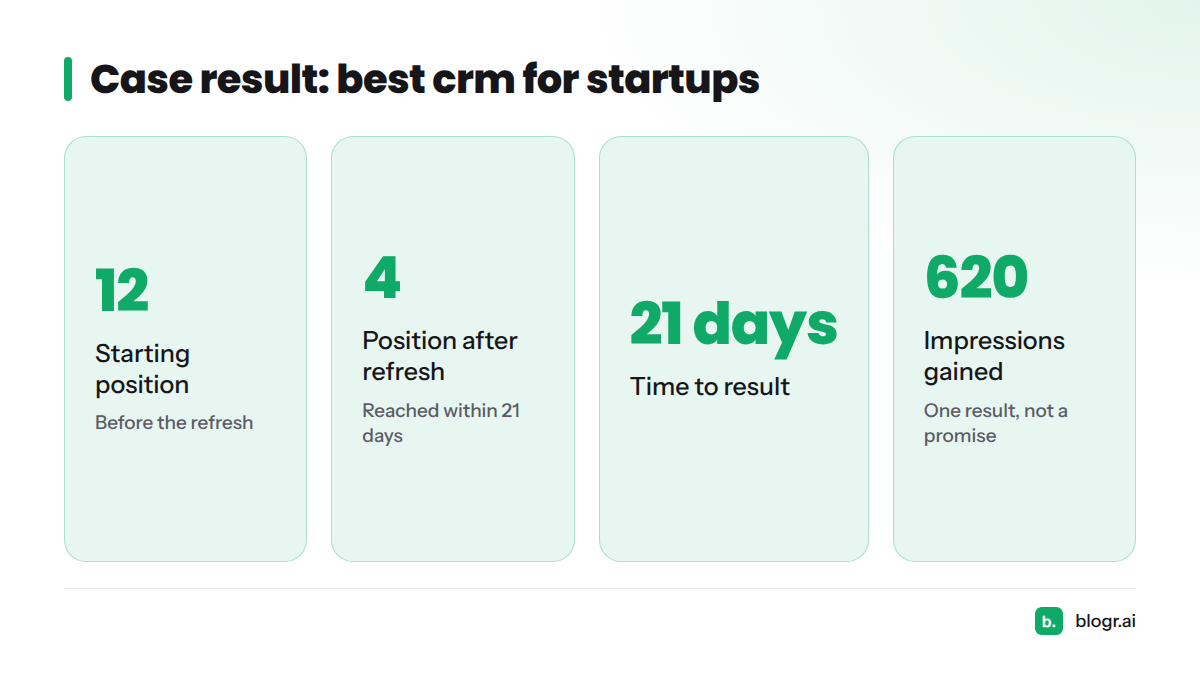
Be careful with that number. It is one result, not a typical one, and not a promise. Competition, site authority and timing all matter. What we can say is that a brief built from the live results gave us specific, testable edits instead of vague ones.
Next steps: want to run the same process on your own post? Download our content refresh checklist, or start a free trial of blogr.ai and let it pull the Search Console baseline for you. You can learn more about the platform on the blogr.ai homepage.
FAQ
Does updating old blog posts actually help SEO?
It can, but it is not guaranteed. Updates help most when they fix a real gap: outdated facts, missing subtopics, or a mismatch with current search intent. Cosmetic edits rarely move anything. Measure against your baseline.
Should I keep the same URL when updating?
Yes, in almost every case. The URL holds your existing links and history. Change the slug only for a strong reason, and then use a 301 redirect.
Should I update the publish date or show a "last updated" date?
Show a "last updated" date after real changes, and keep it consistent with your structured data. Google advises against misleading dates.
Does changing the date alone improve rankings?
No evidence suggests it does, and Google warns against date manipulation. Improve the content first.
How do I request indexing after updating a post?
Open Search Console, paste the URL into URL Inspection, and click Request Indexing. One request is enough, and it does not guarantee a speed-up.
How long does it take to see results after a refresh?
It varies. Check at four and eight weeks against your baseline. Some pages move within weeks, and others do not move at all.
What if rankings don't improve after the update?
Re-check the live SERP. The intent may have shifted again, or competitors may have added depth you missed. Adjust once, wait, and decide whether the topic is worth more effort.
Is the #12 to #4 result typical?
No. It is one first-party result for "best crm for startups" over 21 days, with 620 more impressions. Treat it as an example of the method, not a forecast.
Sources
- Search Console Performance report, Google Search Console Help
- Creating helpful, reliable, people-first content, Google Search Central
- Influencing title links in search results, Google Search Central
- Control your snippets in search results, Google Search Central
- Influence your byline dates in Google Search, Google Search Central
- Ask Google to recrawl your URLs, Google Search Central
- Does updating old blog posts actually help with rankings? r/bigseo, Reddit