


How to Create a Topical Map: 7 Steps for SEO

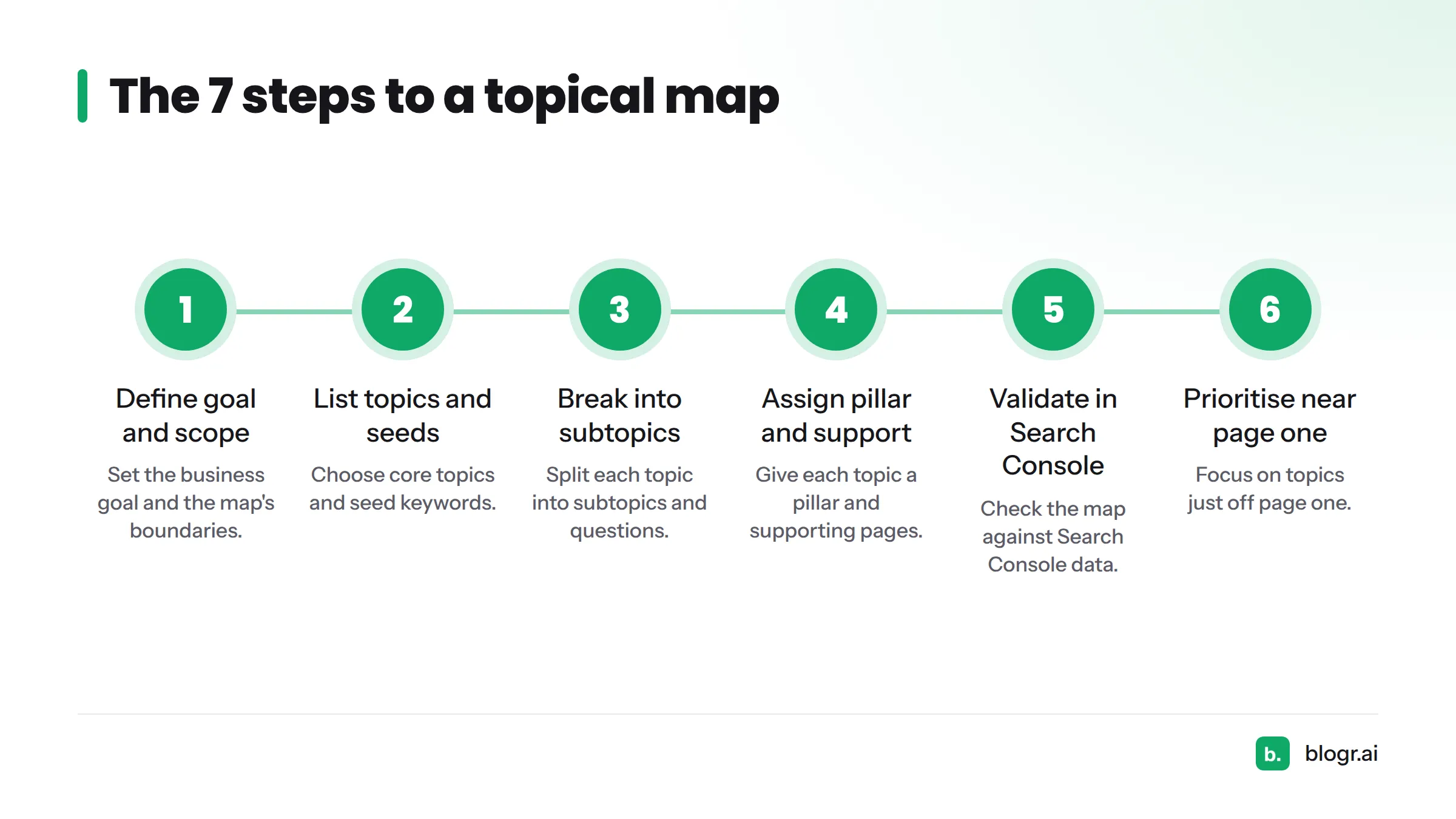
A topical map is a structured plan of the topics, subtopics and pages that cover a subject area on your website. (This is the SEO kind of map, not a geographic contour map.) To create one from scratch, define your business goal, list core topics and seed keywords, break each into subtopics and questions, assign pillar and supporting pages, validate the plan in Google Search Console, prioritise topics just off page one, and document a publishing order.
I have built these maps for my own products, and the part most guides skip is the last three steps. A map that sits in a spreadsheet and never meets real search data is a guess. Here is the full method for topical mapping, with a topical map template and a worked topical map example you can copy.
The 7 Steps at a Glance
- Define the business goal and scope.
- List core topics and seed keywords.
- Break each topic into subtopics and questions.
- Assign a pillar and supporting pages.
- Validate the map against Search Console.
- Prioritise topics just off page one.
- Document the map as a publishing order.
Want a head start? The free topical map generator drafts a starter map you can refine with the steps below, which makes it a quick route to a topical map for free.
What a Topical Map Does for SEO
A topical map for SEO shows what you will write, how each page relates to the others, and which page leads each topic. Think of it as a content hierarchy drawn before you publish, not after.
The goal behind it is topical authority: covering a subject so completely that search engines and readers treat your site as a reliable source. If you hit an unfamiliar term along the way, the blogr.ai SEO glossary defines it in plain English.
Step 1: Define the Business Goal and Scope of Your Topical Map
Every map needs a reason to exist. Start there, or you will end up with a long list of topics that never connects to revenue.
Choose the one business outcome the map serves
Pick one outcome per map: trial sign-ups, booked consultations, product sales, or newsletter growth. A map built for "more traffic" sprawls. A map built for "more booked consultations for a local bookkeeper" gives you a filter for every topic you consider.
Set the boundary: what is in and out
Write two short lists: topics inside the map and topics outside it. This stops scope creep later.
Scope example (hypothetical): A small bookkeeping firm for freelancers decides its map covers "bookkeeping for freelancers." Inside: invoicing, expense tracking, quarterly tax prep. Outside: corporate accounting, payroll for large teams, and general business law.
Step 2: List Your Core Topics and Seed Keywords
Core topics are the three to six big subjects your business should be known for. Seed keywords are the short, broad phrases that describe them.
Start from what you sell and what customers ask
Open your sales emails, support inbox, and product pages. Note the nouns customers use. A founder selling scheduling software hears "no-shows," "reminders," and "double booking" again and again. Those become core topics, not whatever sounds impressive in a keyword tool.
Capture seed keywords in a sheet
Create a topical map spreadsheet in Google Sheets or Microsoft Excel. Add one row per core topic with two or three seed keywords beside it. Keep it short. Five core topics with three seeds each is a solid start for a small site.
Step 3: Break Each Core Topic into Subtopics and Questions
This step turns a handful of topics into dozens of specific pages.
Pull subtopics from questions, search suggestions and related searches
Type each seed keyword into Google and note the autocomplete suggestions, the "People also ask" box, and the related searches at the bottom. Add the questions customers asked in Step 2. A keyword research pass in your own Search Console data also surfaces phrases people already use to find you.
Tag each subtopic with search intent
Label every row with one intent: informational, commercial, transactional, or navigational. "How to track freelance expenses" is informational. "Best bookkeeping software for freelancers" is commercial. Intent decides the page format, so tag it now instead of guessing during writing.
When subtopics overlap, group them so one page serves each cluster. The free keyword clustering tool does that grouping for you.
Step 4: Assign a Pillar Page and Supporting Pages to Each Topic
Now give every topic a structure.
Choose the pillar, then assign supporting pages
The pillar page is the broad, central guide for a core topic. Supporting pages go deeper on one subtopic each and link back to the pillar. In your sheet, mark each row as "pillar" or "supporting" and name the pillar it belongs to.
A workable rule of thumb: one pillar per core topic, and as many supporting pages as you have distinct subtopics with their own intent. Do not pad. If two subtopics answer the same question, merge them.
Structure (hypothetical):
| Level | Page | Role |
|---|---|---|
| Pillar | Bookkeeping for Freelancers: A Complete Guide | Broad overview, links to every supporting page |
| Supporting | How to Track Freelance Expenses | Informational, step-by-step |
| Supporting | Invoice Templates for Freelancers | Transactional, template download |
| Supporting | Quarterly Tax Prep Checklist | Informational, checklist |
Plan how these pages link to each other as you go. Google's own guidance on links explains how crawlable links help it find and understand your pages.
Step 5: Validate the Map Against Google Search Console
This step separates a useful map from a wish list. Before you write anything, check what Google already knows about your site.
Check which planned topics you already appear for
Open the Performance report in Google Search Console. Google documents the report on its Performance report help page. The interface changes now and then, so check that page if a label looks different.
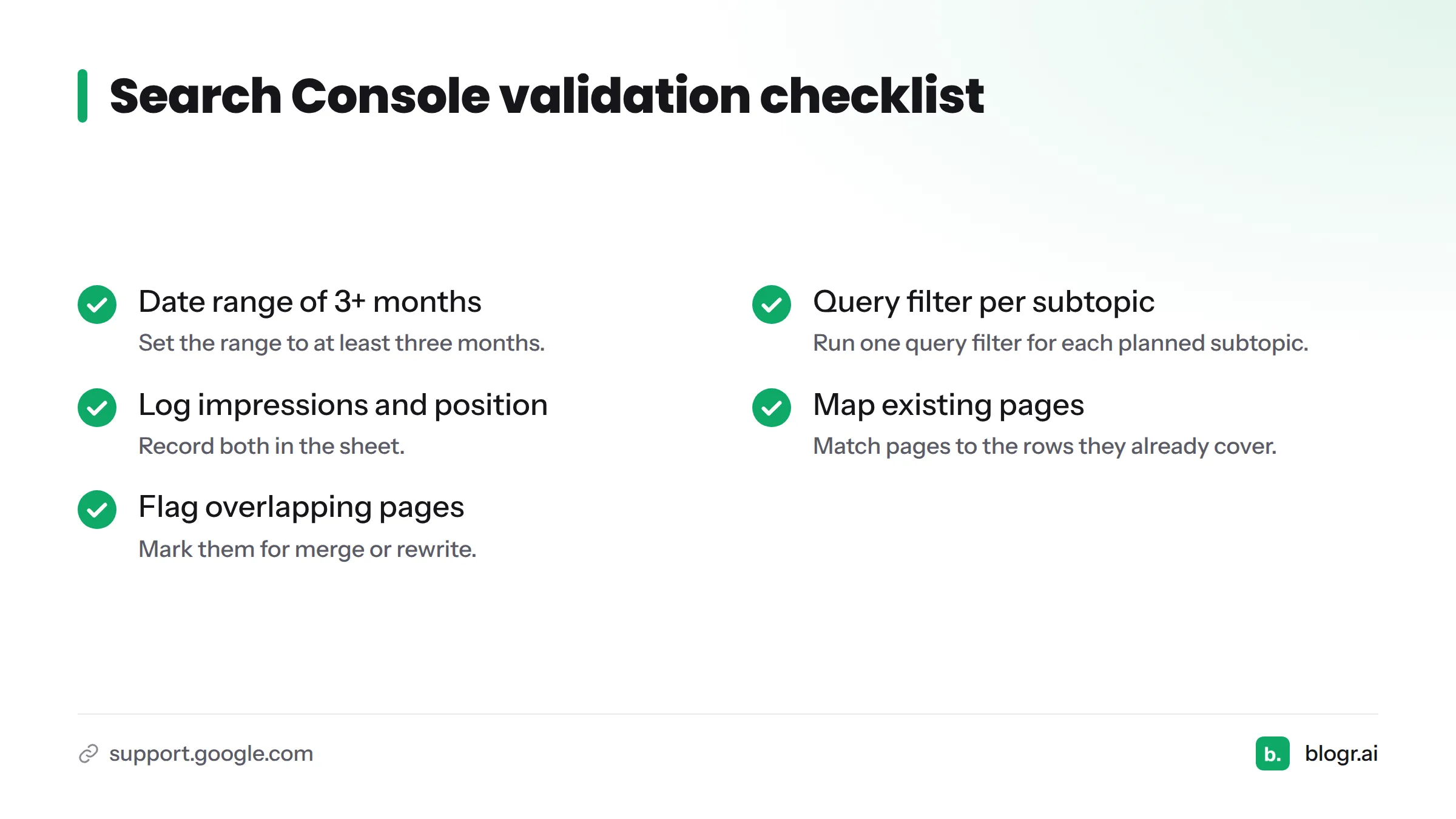
- Set the date range to the last three or six months.
- Add a Query filter using a word from one planned subtopic, such as "expenses."
- Note the impressions and average position for matching queries.
- Record those numbers in your spreadsheet next to the row.
New site with no data? Skip this step for now and return after a few weeks of publishing. For a walkthrough, read how to find keywords in Search Console and how to read Search Console data. You can also run the free Search Console audit.
Spot content gaps and cannibalisation risks
Two things to watch. If a planned topic has no impressions, you have a true gap. If two existing pages appear for the same query, you may have cannibalisation, so plan to merge or differentiate them rather than add a third page.
Search Console validation checklist:
- Date range set to at least three months
- One query filter run per planned subtopic
- Impressions and average position logged in the sheet
- Existing pages mapped to the rows they already cover
- Overlapping pages flagged for merge or rewrite
Step 6: Prioritise Topics Sitting Just Off Page One
You cannot publish everything at once, so rank the rows.
My working heuristic
This is my own rule of thumb, not an established rule or a Google guideline. Topics where the site already earns impressions but sits just past page one (roughly positions 8 to 20) tend to be cheaper to improve than topics with no footprint. Google has already associated the site with the query, so a stronger, better-matched page is a smaller leap. The striking distance keywords guide shows how to find them.
Combine business value, impressions and effort
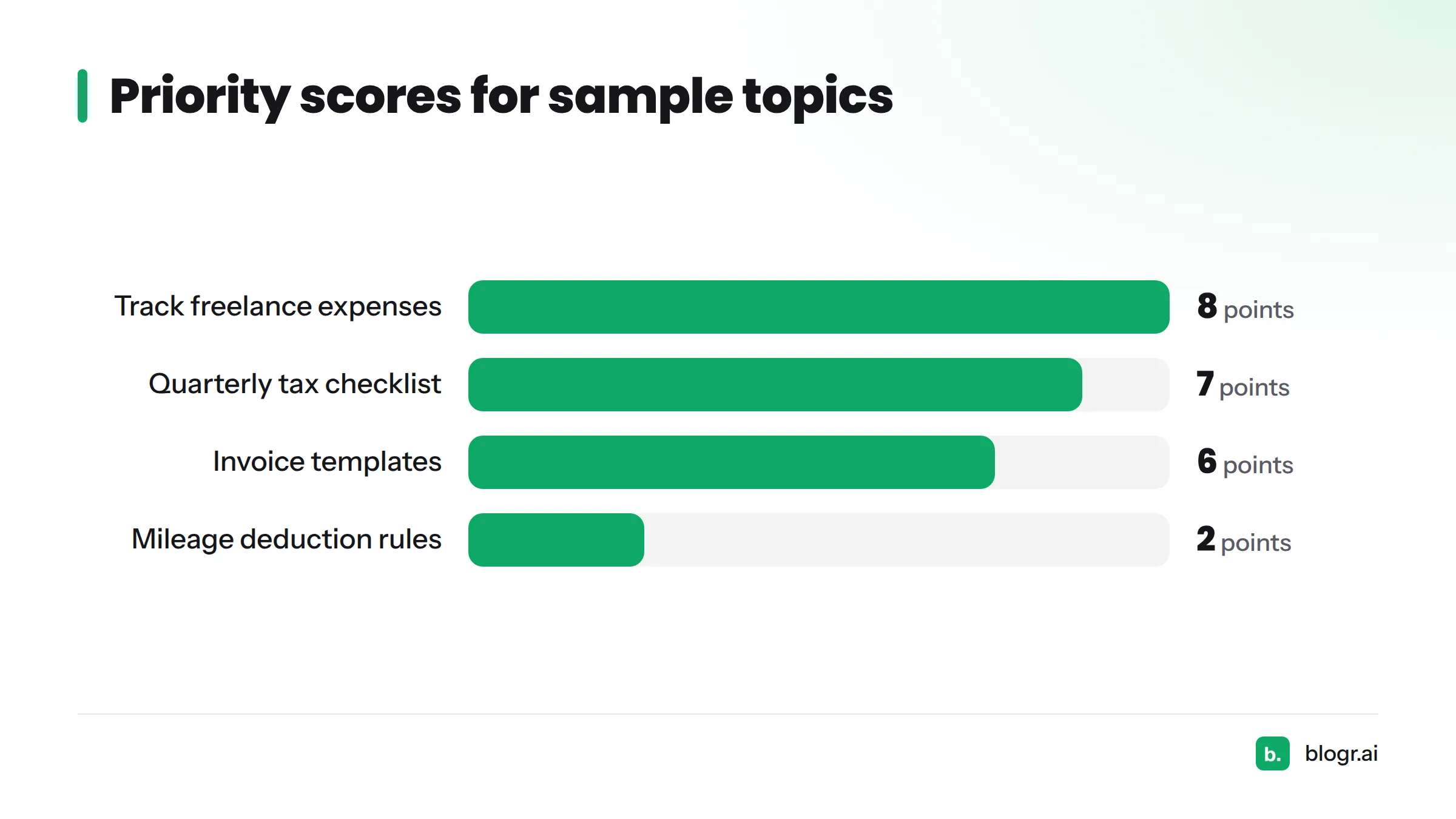
Score each row from 1 to 3 on three factors, then add them up.
| Topic (hypothetical) | Business value | Existing impressions | Effort (3 = low) | Total | Priority |
|---|---|---|---|---|---|
| Track freelance expenses | 3 | 3 | 2 | 8 | 1 |
| Quarterly tax prep checklist | 3 | 2 | 2 | 7 | 2 |
| Invoice templates | 2 | 1 | 3 | 6 | 3 |
| Mileage deduction rules | 1 | 0 | 1 | 2 | Later |
The numbers are illustrative. Use your own scale, and keep it simple enough that you actually finish scoring.
Step 7: Document the Map and Turn It into a Publishing Order
Spreadsheet or document layout
Put everything in one sheet. This is your topical map template, and each column has a job:
| Column | Purpose |
|---|---|
| Topic | The core topic the row belongs to |
| Subtopic | The specific page idea |
| Search intent | Informational, commercial, transactional or navigational |
| Page type | Pillar or supporting |
| Target URL | The planned or existing URL |
| Status | Idea, briefed, drafted, published, refresh |
| Impressions | From the Search Console check |
| Average position | From the Search Console check |
| Priority | Score or rank from Step 6 |
Sequence pillars and supporting pages
Sort by priority, then adjust for structure. Publish or refresh the pillar early so supporting pages have something to link to, but do not hold back a high-priority supporting page for weeks. A sensible order: top-priority existing pages first (refresh them), then the pillar, then supporting pages by score. Aim for a queue you can finish in 30 days, then revisit.
Need a tool to keep this running? Topical map software tracks the plan, and the free topical map generator gives you a starter map to paste into your sheet.
Topical Map Example: A Bookkeeping Firm for Freelancers
This fictional site is invented for illustration. It is not client data.
- Business goal: Booked consultations
- Core topic 1, expense tracking. Pillar: expense tracking guide. Supporting: receipts, mileage logs, home office costs, spreadsheet vs app.
- Core topic 2, invoicing. Pillar: freelance invoicing guide. Supporting: invoice templates, late payment reminders, payment terms.
- Core topic 3, quarterly taxes. Pillar: quarterly tax guide. Supporting: deadlines checklist, estimated payment basics, record-keeping.
That adds up to three pillars and about twelve supporting pages. After the Search Console check, the firm finds it already earns impressions for "track freelance expenses" at an average position around 14. That row jumps to priority one, and the team refreshes the page before writing anything new.
Six Mistakes That Weaken a Topical Map
- Going too broad. Ten core topics on a small site means none get covered well.
- Too many pillars. Start with three to five.
- Duplicating pages. Two pages for one intent compete with each other.
- Ignoring existing content. Map your current pages first, then add new ones.
- Skipping intent. A product page cannot satisfy an informational query.
- Treating the map as finished. Revisit it after each publishing cycle.
FAQ
What is a topical map in SEO?
A topical map is a structured plan of the topics, subtopics and pages that cover a subject area on your site. It shows which page leads each topic and how supporting pages relate to it.
How do you create a topical map from scratch?
Define a business goal, list core topics and seed keywords, break them into subtopics, assign pillar and supporting pages, validate in Search Console, prioritise, and document a publishing order. That is the topical map step by step approach covered above.
Is there a free topical map template?
Yes. Build one in Google Sheets with the columns in Step 7, or start from the free topical map generator.
How many topics should a topical map have?
For a small site, three to five core topics with a pillar each is plenty. Add more only after you have covered those well.
How is a topical map different from a content calendar?
The map decides what to cover and how pages relate. The calendar decides when each piece goes live. Build the map first, then turn it into a calendar.
Can I build a topical map for a brand-new site?
Yes. Skip the Search Console check until the site has impressions, and prioritise by business value and effort instead.
How often should I update a topical map?
Review it after every publishing cycle, roughly monthly for active sites, using fresh impressions and position data.
Next Steps
You now have the steps, the template and an example. If you would rather not run it all by hand, try blogr.ai and let it turn your map and Search Console data into a publishing plan. Prefer to see the platform first? Start at the blogr.ai homepage.