


SEO Agency Software: Run Content Across Client Sites
SEO agency software should let you run content for many clients without adding headcount. blogr.ai does that. One agency account covers many client sites, and each site gets its own research, briefs, approval queue and publishing route. Every title waits for an approve or decline, so clients keep control while your output grows. Start the 7-day free trial on one client site and check the Agency plan pricing there.
At a glance: research from live SERPs and Search Console, per-title approval, five publishing routes, 7-day free trial.
What SEO Agency Software Has to Do Across Many Client Sites
SEO agency software is a platform that plans, produces and publishes search-focused content for several client sites from one account. A good multi-site workflow keeps each client's topics, voice and publishing destination apart, so nothing leaks from one account to another.
Four jobs matter most:
- Find demand. Pull topics from real search data, not guesses.
- Plan. Turn that demand into a topical map for each client.
- Publish. Send finished posts to whatever CMS the client runs.
- Keep clients in control. Nobody wants a surprise post on their own domain.
The Agency Problem: Many Sites, Limited Hours
Take a typical Tuesday. One client runs WordPress, another lives on Webflow, a third sells through Shopify. Each has a different voice and a different habit for signing off on content. Your billable hours don't stretch to match.
In my experience with agency-style workflows, the writing is rarely the bottleneck. Coordination is. Who approved what? Where does this post go? Which client still owes feedback?
Where One-Site Tools Break Down
Tools built for a single site assume one brand voice, one CMS and one decision-maker. Run five clients through them and you end up juggling logins, pasting drafts between tabs and chasing approvals by email. For the full how-to on agency workflows, browse the blogr.ai blog.
How One Agency Account Maps to Multiple Client Sites
The structure is simple. Each client gets a site inside your agency account, with its own topics, voice and queue.
| Layer | What lives there |
|---|---|
| Agency account | Your login and all client sites |
| Client site | One per client, separate settings |
| Topical map and titles | Topics sourced for that site only |
| Approval | The client's approve or decline on each title |
| CMS | The client's own publishing destination |
Titles come from queries a site already appears for in Search Console, plus any focus topics you set. Briefs are built from the live SERP, so each article reflects what ranks today. If you already hold Google Search Console access for your clients, you start with real data on day one.
Publishing Across WordPress, Webflow, Shopify, Ghost and Webhooks
One account can serve clients on different CMSs at the same time, so nobody has to migrate. The CMS publishing integrations page has the detail.
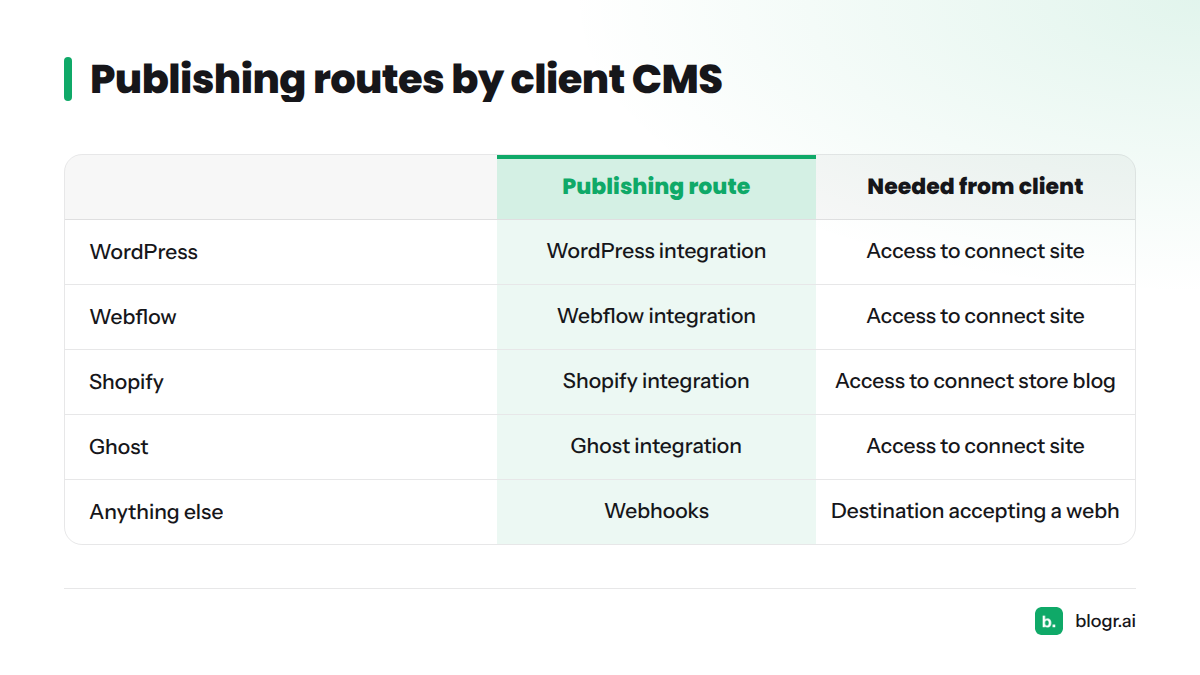
| Client CMS | Publishing route | What you need from the client |
|---|---|---|
| WordPress | WordPress integration | Access to connect their site |
| Webflow | Webflow integration | Access to connect their site |
| Shopify | Shopify integration | Access to connect their store blog |
| Ghost | Ghost integration | Access to connect their site |
| Anything else | Webhooks | A destination that accepts a webhook |
When a Client's CMS Isn't on the List
Send content to a custom stack through webhooks or the REST API. The integration docs hold the setup steps, so this page leaves them there.
Per-Title Approval Keeps Clients in Control
Trust carries agency work. The approval-first design means nothing gets written without a yes, and nothing publishes behind the owner's back. Here is how the gate works:
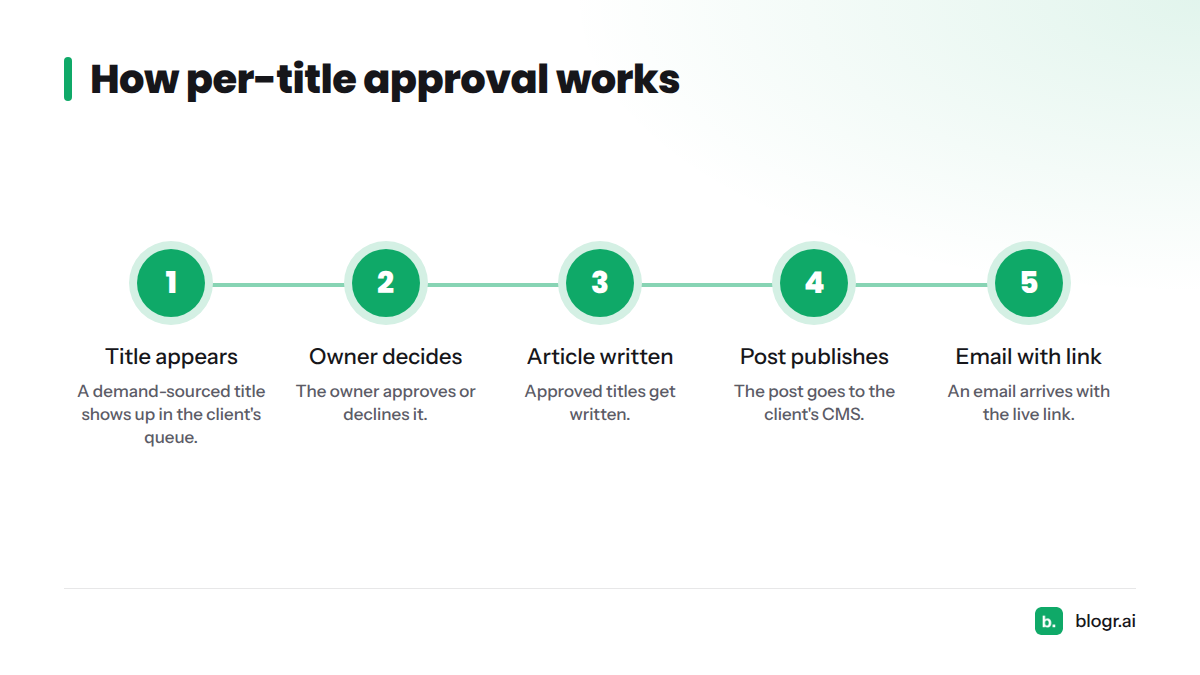
- A demand-sourced title appears in the client's queue.
- The owner approves or declines it.
- Approved titles get written.
- The post publishes to the client's CMS.
- An email arrives with the live link.
A declined title simply goes away. That single gate answers the question most clients ask first: "Will you post things without telling me?"
Autopilot as an Optional Mode
Some clients want none of that oversight and just want results. Autopilot mode exists for them. You switch it on per site, so one client can run on full autopilot while the next approves every title.
What to Look for When You Shortlist Agency SEO Tools
Check any candidate against this list:
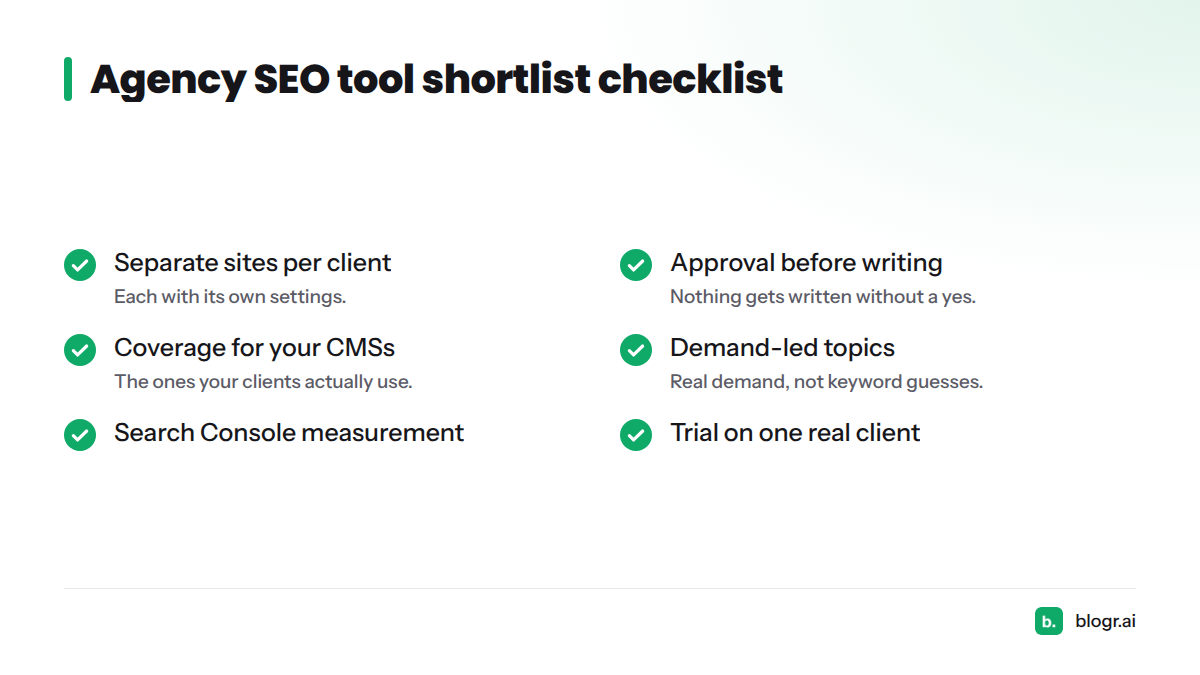
- Separate sites per client, each with its own settings
- Approval before anything gets written
- Coverage for the CMSs your clients actually use
- Topics led by real demand, not keyword guesses
- Internal linking handled inside the content
- Measurement through Search Console
- A trial you can run on one real client
The best SEO software for agencies depends on your main need: content execution, research or reporting. Pick for the job you do most. For background on how Google surfaces and measures pages, Google Search Central is the authoritative reference.
Is This the Right Fit for Your Agency?
Let's be straight about scope. blogr.ai runs the content loop. It is not a backlink index, a technical crawler or a reporting suite.
| Good fit | Look elsewhere |
|---|---|
| Agencies producing blog content for several client sites | Needs centered on backlink analysis |
| Clients who want sign-off on every title | Needs centered on technical site crawling |
| Mixed CMS setups across your client list | Full-service reporting dashboards |
| Teams starting from Search Console data | Single-site founders (see the founders guide) |
Most agencies pair a content platform with the audit and reporting tools they already use, and that pairing works well.
Next Steps: See the Agency Setup
Pick one client, connect their site and watch the first titles arrive for approval. Start the 7-day free trial on one client site, then review the Agency plan pricing before you roll it out wider. You can also browse the full feature set.
FAQ
Can one account run several client sites?
Yes. One agency account holds many client sites, each with its own topics, voice and queue.
Do clients approve articles before they go live?
Yes. Every title waits for an approve or decline. Nothing gets written without a yes, and nothing publishes without the owner's approval unless they switch on autopilot.
Which CMSs can an agency publish to?
WordPress, Webflow, Shopify and Ghost have direct routes. Webhooks and the REST API cover custom setups.