


SEO for Electricians: A Practical Step-by-Step Guide
The phone goes quiet for a week. Then you spot a competitor's van two streets over and wonder how they keep landing the calls. It's a common story for owner-operators with no SEO team and no spare hours.
I wrote this plan for that situation. You can run it yourself, in order, with no agency and no guesswork.
Here is the short version. Pick service-and-town searches as your goal. Build one page per core service. Complete your Google Business Profile. Keep your business details identical everywhere. Publish local answers, earn reviews, and check results every quarter.
One caveat up front. Every example below is illustrative, not a customer result. This guide also gives no electrical safety, wiring, code, or licensing advice.
The nine steps at a glance
| Step | What you do | Where it shows up |
|---|---|---|
| 1 | Set a goal around service-and-town searches | Your notes and tracking sheet |
| 2 | Read Search Console for queries that already show impressions | Google Search Console |
| 3 | Build one page per core service | Your website |
| 4 | Add location pages only for towns you serve | Your website |
| 5 | Claim and complete your Google Business Profile | Google Search and Maps |
| 6 | Add local schema and keep business details consistent | Website code and listings |
| 7 | Publish helpful local content | Your blog |
| 8 | Earn reviews and local citations | Profile and directories |
| 9 | Track results and refresh every quarter | Search Console and your profile |
Local SEO for electricians is the work of making your site and your Google Business Profile easy for Google to match with nearby homeowners searching for electrical help. Google says local results rely mainly on three factors: relevance, distance, and prominence, as described in its Improve your local ranking on Google, Google Business Profile Help. Each step below works on at least one of them.
Step 1: Set a goal around service-and-town searches
Start with the searches you want to win, not with tactics.
What a service-and-town query looks like
A service-and-town query pairs a job with a place. A homeowner types something like "ceiling fan installation Springfield" or "electrician near me." The pattern never changes: what they need, plus where they are. These searches turn into phone calls, so build around them. (The town names here are examples only.)
A staged goal you can defend
Nobody can promise you a ranking, and you should distrust anyone who does. Set a goal in stages instead:
- More impressions for your service-and-town searches.
- More clicks from those impressions.
- More calls and quote requests from those clicks.
Write down three to five services and the towns you actually work in. That list drives everything else.
Step 2: Check Search Console for queries that already show impressions
Before you build anything, see what Google already knows about you. If your site is verified in Google Search Console, it is already collecting data.
Queries, impressions, and clicks
A query is the search someone typed. An impression is one appearance of your page in that person's results, whether or not they clicked. A click is a visit. Search Console's Performance report lists all three by query and by page.
An illustrative query table
This table shows how to read rows. It is not data from a real electrician.
| Query | Impressions | Clicks | What it tells you |
|---|---|---|---|
| panel upgrade springfield | 140 | 2 | Demand exists, so the page needs work |
| electrician springfield | 900 | 30 | Healthy, so protect it |
| ev charger installer shelbyville | 60 | 0 | No dedicated page yet |
What to do with each pattern
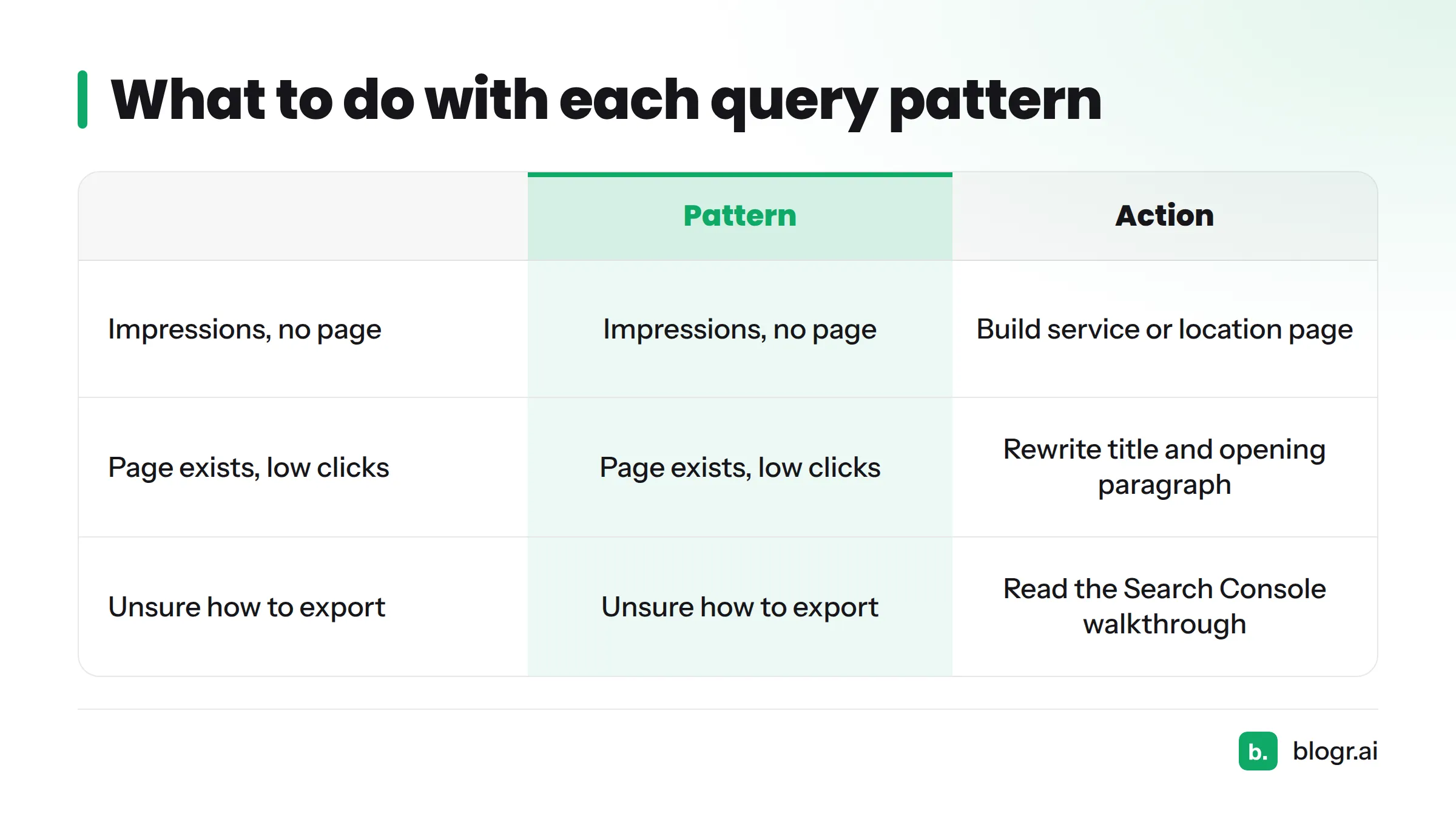
- Impressions, no page for it: build a service or location page (Steps 3 and 4).
- A page exists but clicks are low: rewrite the title and opening paragraph so they match the search. The guides on why you rank but get no clicks and striking distance keywords walk through the fix.
- Not sure how to export or filter the data: our walkthrough on finding keywords in Search Console covers the clicks.
Step 3: Build one page per core electrical service
A single "Services" page with a bullet list of everything gives Google little to match against a specific search. A dedicated page for each core job does. Good candidates are the services you sell most, such as lighting, panel work, EV charger installation, or rewiring quotes. Choose yours from your own job history and your Step 2 data.
What goes on a service page
Use the same structure on every one:
- The service: a plain title and a one-sentence description.
- Who it is for: homeowners, landlords, small businesses.
- What the visit involves: described in non-technical terms, such as how you quote, how long a visit usually runs, and how you tidy up.
- Service area: the towns you cover.
- Proof: real photos of your own work, reviews, and any accreditations you hold.
- Contact: a phone number and a short quote form near the top.
Keep it honest and specific to your business. For a founder-friendly refresher on titles, headings, and internal links, read on-page SEO for founders without an SEO team.
Short on time? Build your top three services first and add the rest later.
Step 4: Add location pages only for towns you actually serve
Location pages help when they say something real. They hurt when they are the same page with the town name swapped. Google's spam policies call this doorway abuse: pages made to rank for similar searches that lead people to the same place.
Three questions before you build a town page
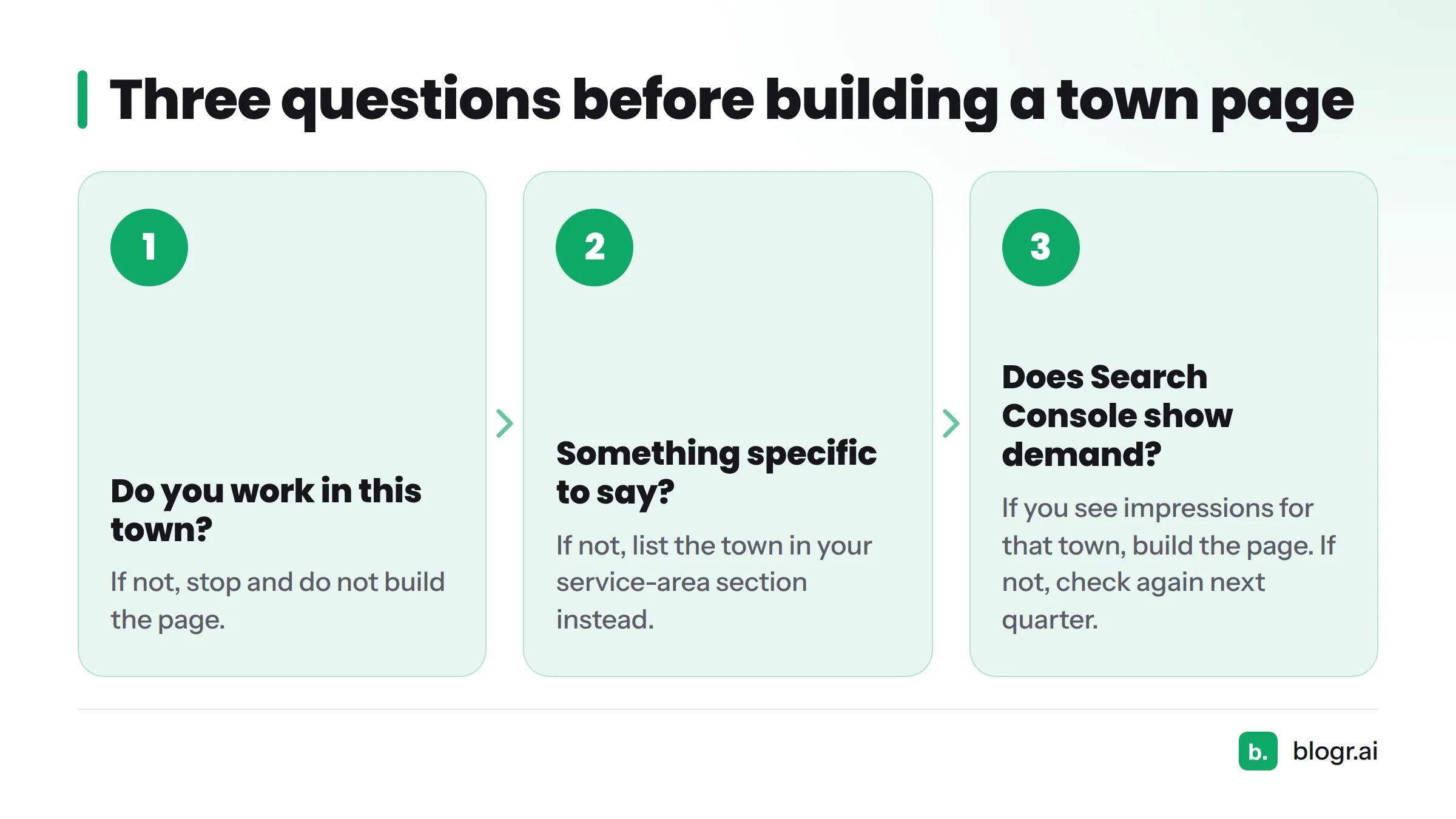
Ask these in order:
- Do you actually work in this town? If not, stop. Do not build the page.
- Do you have something specific to say? Local jobs you have done, nearby neighborhoods, travel and scheduling details, local reviews. If not, list the town in your service-area section instead.
- Does Search Console show demand? If you see impressions for that town, build the page. If not, check again next quarter.
Only three "yes" answers earn a page.
Why thin duplicate pages backfire
Near-identical pages compete with each other and give visitors nothing new. They can also look like the doorway pages Google warns about. One strong page for a town beats ten clones. If you end up with overlapping pages, a canonical URL tells Google which version counts.
| Page type | Build it when |
|---|---|
| Service page | You sell the service regularly |
| Location page | You serve the town, have local details to share, and see demand |
| Blog post | Homeowners ask a question your pages do not answer |
Step 5: Claim and complete your Google Business Profile
Your Google Business Profile is often the first thing a homeowner sees. It's free, and you control it. Claim it through Google Business Profile, then verify it.
Categories, services, service area, hours, and photos
- Main category: choose the one that best describes your main work, such as "Electrician," then add accurate secondary categories.
- Services: list each service you offer in plain words.
- Service area: if you travel to customers and don't serve them at a shop, set the towns you cover and hide your home address. Google's guidelines for representing your business explain which settings apply.
- Hours: keep them current, including holiday changes.
- Photos: upload real photos of your team, van, and finished work.
The local pack, defined
The Google Maps local pack is the short list of three businesses, shown with a map, that appears above many local results. Your profile feeds it. Because Google ties local rankings to relevance, distance, and prominence, a complete, accurate profile with reviews gives you the best chance of appearing.
Step 6: Add local business schema and consistent business details
Two small jobs here help Google trust your details.
NAP consistency
NAP stands for name, address, and phone number. Use the same business name, phone number, and address format on your website, your profile, and every listing. A mismatch like "Smith Electric" in one place and "Smith Electrical Services LLC" in another creates doubt. Pick one version and copy it everywhere.
LocalBusiness schema and the Electrician type
Structured data is code that labels your details so search engines can read them. Google documents the local business structured data it supports, and schema.org defines a more specific Electrician type that sits under LocalBusiness. You would mark up your name, phone, address, hours, and service area using JSON-LD.
Do you need to write it yourself? Often no. Many WordPress SEO plugins and site builders add local business markup from a settings form. Check your result with Google's Rich Results Test. For a plain-English primer, read our guide to structured data for SEO.
Step 7: Publish electrician blog topics that answer homeowner questions
A blog is optional, but it's the best place to capture questions your service pages don't answer.
Where topics come from
- Search Console queries phrased as questions.
- Questions customers ask you on calls and at quotes.
- Gaps on your service pages.
Electrician blog topics to start with
These are example angles. None involves wiring or code instruction:
- What to ask an electrician before you book
- What affects the price of an electrical quote
- How to prepare your home for a visit
- How to compare two quotes fairly
- What a typical quote visit looks like in your area
- A write-up of a local job, with the owner's permission
Write the way you'd talk to a customer: short, clear, and honest about what you do and don't cover. Our glossary of SEO terms can help if the jargon trips you up. Local SEO content and blog SEO for local businesses will get their own dedicated guides, so this article stays focused on the electrician plan.
Step 8: Earn reviews and local citations
Reviews sit near the center of prominence, and customers read them before they call.
Asking for reviews the right way
Ask every happy customer right after the job, and send a direct link to your profile. Reply to every review, good or bad, politely and briefly. Follow Google's prohibited and restricted content policy for reviews: don't offer payment or gifts for reviews, and don't write your own. There's no magic number of reviews to reach. Aim for steady, recent, genuine ones.
Local citations
A citation is a mention of your business name, address, and phone number on another site, such as Yelp, Angi, or the Better Business Bureau. Claim the listings that matter in your area, and apply the NAP rule from Step 6 to each one. Ten accurate listings beat fifty messy ones.
Step 9: Track results and refresh pages every quarter
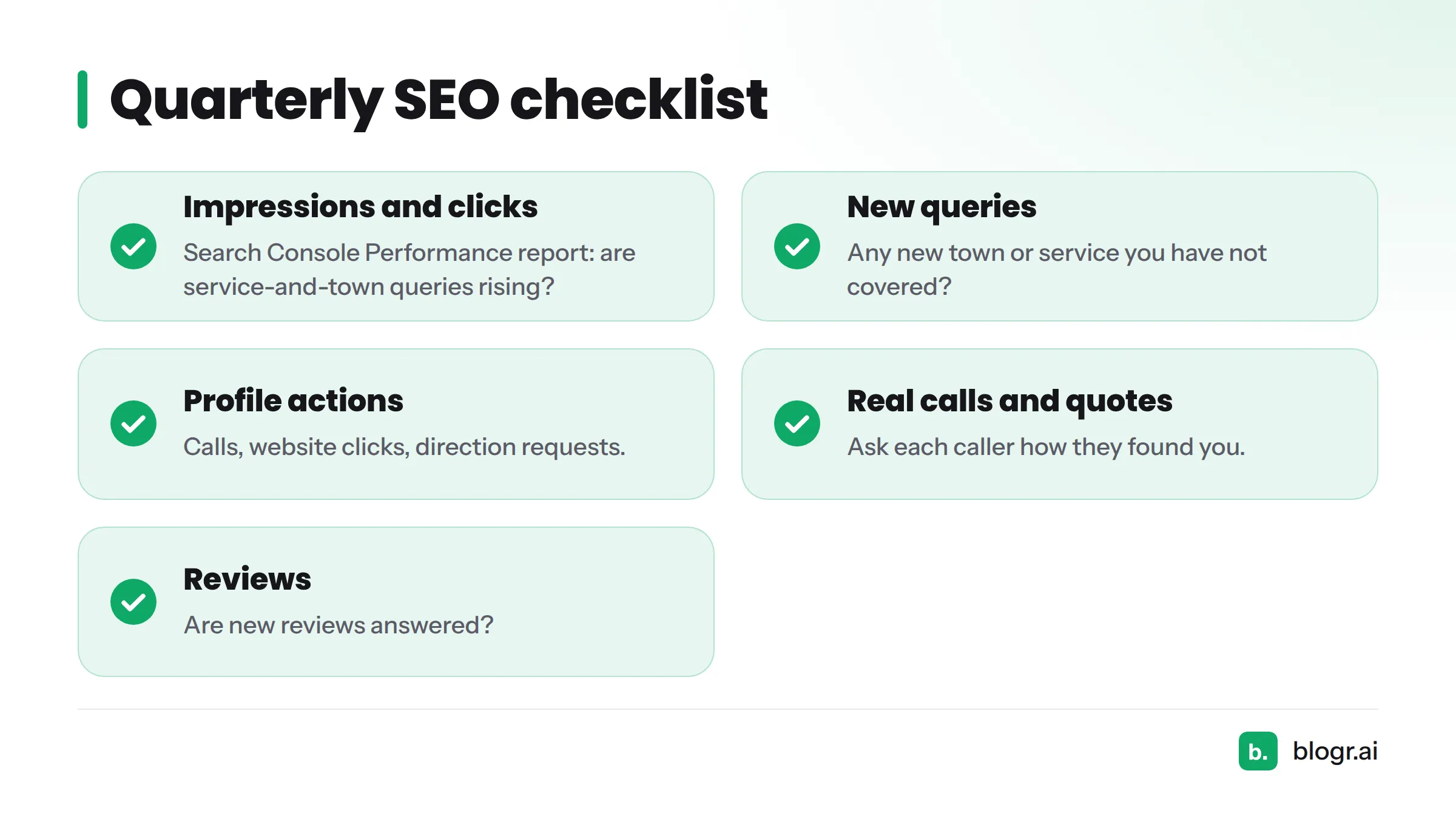
SEO is a loop, not a one-time project. Once a quarter, spend an hour on this checklist.
Quarterly checklist
| Check | Where | What to look for |
|---|---|---|
| Impressions and clicks | Search Console Performance report | Are service-and-town queries rising? |
| New queries | Search Console | Any new town or service you have not covered? |
| Profile actions | Google Business Profile | Calls, website clicks, direction requests |
| Real calls and quotes | Your phone log or CRM | Ask each caller how they found you |
| Reviews | Profile | New reviews answered? |
What to refresh first
Start with pages that have impressions but few clicks. Update the title, tighten the opening, add a fresh photo or a recent local job, and re-check the details. The guide to updating old posts and our Search Console to-do list give you a repeatable routine. A separate on-page SEO checklist will cover page-level fixes in more depth.
Common mistakes electricians make with SEO
- Stuffing every town into one page or footer.
- Copying one town page and swapping the name.
- Leaving the Google Business Profile half finished.
- Using different business names or phone numbers across listings.
- Buying fake reviews or offering rewards for them.
- Never checking Search Console, so decisions rest on guesses.
- Making promises about electrical safety on a marketing page. Leave that to your professional training and your local regulations.
FAQ
How long does SEO take for an electrician?
Nobody can promise a timeline. Results depend on your competition, your town, and your site's starting point. Google's own advice is that changes can take time to show effects, so check your data each quarter and keep going.
Does an electrician need a page for every town?
No. Build a page only if you serve the town, have something specific to say, and see demand. Otherwise list the town in a service-area section.
Do I need a blog?
Not at first. Service pages and a strong Google Business Profile come first. Add a blog when customers keep asking questions your pages don't answer.
Is Google Business Profile or my website more important?
You need both. The profile often wins the map listing and the quick call. The website holds the detail that convinces people to book and gives Google more to match.
How many reviews do I need?
There's no fixed number. Earn them steadily from real customers, and reply to each one.
Can I do electrician SEO myself?
Yes. The nine steps above are written for owner-operators. An agency can save time if you'd rather spend your hours on jobs, and you can check any agency's work with the same Search Console and profile reviews.
Next steps
Open Search Console today and start with Step 2. The queries you find there tell you what to build first. If you'd rather not do the topic research by hand, see how blogr.ai suggests approved topics from your Search Console queries, and start a 7-day free trial to try it on your own site.
Sources
- Improve your local ranking on Google, Google Business Profile Help
- Guidelines for representing your business on Google, Google Business Profile Help
- Spam policies for Google web search, Google Search Central
- Local business structured data, Google Search Central
- Electrician, schema.org
- Prohibited and restricted content, Google Maps contribution policy
- Google Business Profile, Google
Related: schema markup for local businesses