


AI Writing Tools for SEO: How to Choose in 2026

Choosing among AI writing tools for SEO comes down to three checks. Does the tool start from real search demand? Does it build its brief from the live results page? Can you approve a draft before anything publishes? Then settle the question with a side-by-side test on one keyword. Below is the seven-step method we use ourselves, last reviewed in 2026.
A quick disclosure first. blogr.ai builds an AI SEO writer, so we have a stake here. We wrote the method to stay vendor-neutral, and you can run it against any tool, ours included. We have run these tests on our own sites, and we describe what typically differs between tools without inventing numbers.
The Seven Steps at a Glance
- Define the job the tool must do.
- Check whether it starts from Google Search Console demand.
- Test whether it builds a live SERP brief before drafting.
- Run the same keyword through each tool and score the drafts.
- Confirm you can review and approve a draft before publishing.
- Check how it handles your site, voice and internal links.
- Decide, then set up a repeatable review routine.
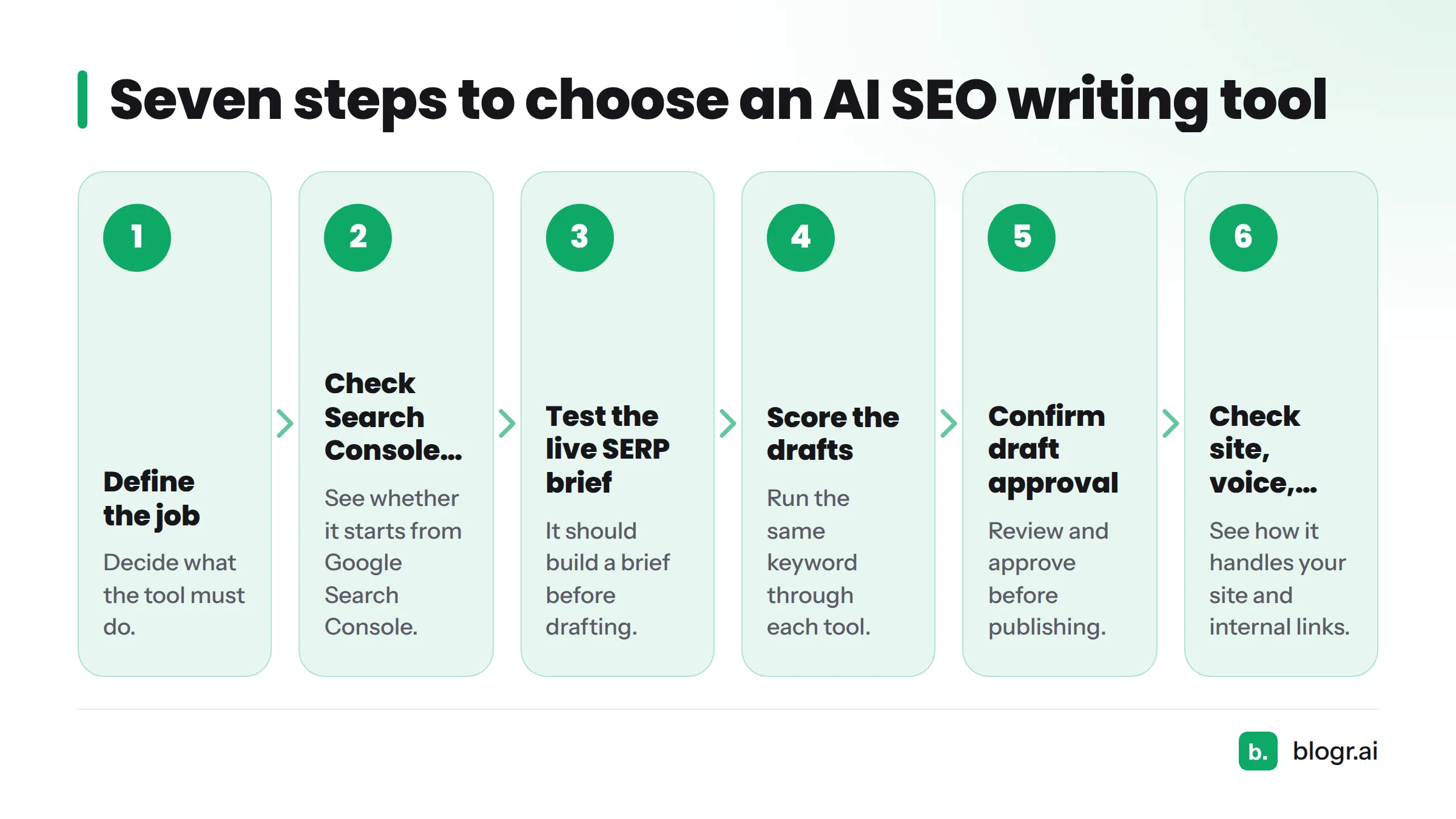
Let's break it down.
Which Type of AI Writing Tool Fits Your SEO Work
AI writing tools are software that uses large language models to help you brainstorm, draft, edit and tune content. For SEO, the useful ones also work from search demand and the live results page.
That one sentence covers three very different product types. Mixing them up is the buying mistake we see most often.
General AI Assistants
Tools like ChatGPT and Claude answer prompts. They are flexible and often cheap. They also know nothing about your site, your queries or what ranks today unless you paste that context in yourself.
AI SEO Writers
An AI SEO writer covers the whole chain: topic selection, a content brief, a draft, on-page work and publishing. It aims at a ranking outcome, not just a text outcome. Our own take is an AI SEO writer that works from live SERP briefs.
Optimizers and Editors
Surfer SEO, Frase and Clearscope score a draft against competing pages using NLP term analysis. They sharpen a draft you already have. They rarely pick the topic for you.
| Tool type | Best job | What it will not do |
|---|---|---|
| General AI assistant | Brainstorming, rewriting, quick drafts | Read your Search Console data or the live SERP on its own |
| AI SEO writer | Topic to published post, with briefs and on-page work | Replace a human editor's judgment |
| Optimizer or editor | Scoring and improving an existing draft | Pick topics or publish for you |
Which one do you need? Ask what you are short on: topics, drafts, or polish. Topics and drafts point to an AI SEO writer. Polish alone points to an optimizer. Wording help alone points to a general assistant. That is the whole "AI writing assistant vs SEO writer" debate: one produces text, the other works toward a ranking.
Two sibling pages cover the rest. The ranked comparison of the best AI SEO writers lists vendors, and Surfer SEO alternatives helps if you are weighing one brand against others.
Step 1: Define the Job Before You Shop
Vague goals produce vague purchases. Spend ten minutes here and every later step gets easier.
Write the Job in One Sentence
A good one: "Publish four posts a week from queries we already almost rank for." Another: "Refresh forty decaying posts without rewriting them by hand." A bad one: "Write blogs faster."
Count Your Team, Sites and Volume
Answer these before you open any pricing page:
- How many sites or clients will use the tool?
- How many posts per month do you need?
- Who edits, and how many minutes can they spend per draft?
- Which CMS do you publish to?
A solo founder and an agency running many client sites need different tools. If you manage several sites, the agency setup shows what multi-site work requires.
Step 2: Check Whether the Tool Starts From Search Console Demand
Guessed keywords quietly sink many AI articles. Real demand lives in Google Search Console, where queries, impressions, clicks and average position show what searchers already associate with your site.
Why Real Queries Beat Guessed Keywords
Google's documentation on the Performance report explains that it shows clicks, impressions, click-through rate and position by query and page. A tool that reads this data writes for searches where you already have a foothold. A tool that doesn't is guessing.
Why "Just Off Page One" Matters
Queries sitting around positions 8 to 20 are usually your cheapest wins, because a new or improved article can often move them. Our guides on striking-distance keywords and finding keywords in Search Console show how to pull that list by hand.
Trial test: connect your property during the free trial and ask the tool, "Which topic should I write next, and why?" A good answer names real queries and impressions from your data. A bad answer is a generic keyword list. For background on this layer, see how blogr.ai turns Search Console data into action.
Step 3: Test Whether It Builds a Live SERP Brief Before Drafting
A content brief tells the writer what the page must contain. What matters is where the brief comes from.
What a Live SERP Brief Contains
A live SERP brief comes from analysis of the results page at the moment you ask. It should show:
- the search intent behind the query (guide, comparison, tool, definition)
- headings shared by pages that rank now
- entities and terms those pages cover
- questions the ranking pages leave unanswered
Spotting Template Briefs and Static Keyword Lists
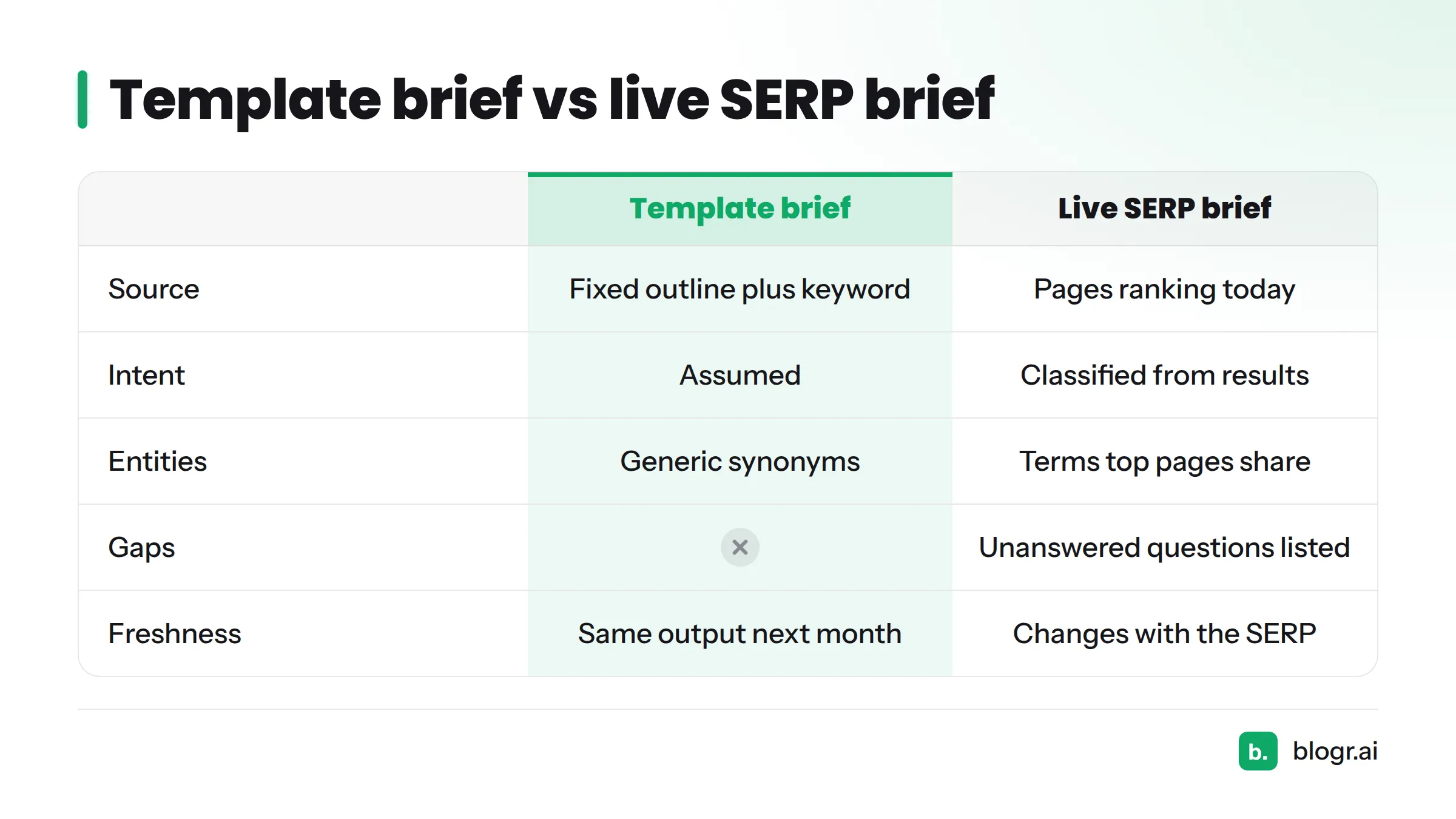
| Template brief | Live SERP brief | |
|---|---|---|
| Source | Fixed outline plus your keyword | Pages ranking today |
| Intent | Assumed | Classified from the results |
| Entities | Generic synonyms | Terms the top pages actually share |
| Gaps | None | Unanswered questions listed |
| Freshness | Same output next month | Changes when the SERP changes |
How to check: run a keyword where the SERP looks unusual, such as one dominated by tools or videos instead of articles. If the brief still proposes a standard blog outline, the tool is not reading the results. Our live SERP briefs feature is built for exactly this check, and you should hold every vendor to it.
Step 4: Run the Same Keyword Through Each Tool and Score the Drafts
No listicle gives you this step, and it settles the argument.
Set Up the Side-by-Side Keyword Test
Keep the rules strict:
- Same keyword, same day, same target audience.
- Same inputs. Don't coach one tool with extra prompts.
- Pick a keyword you care about, ideally a striking-distance query.
- Don't edit before scoring. Edit time is part of the score.
Use a Weighted Rubric
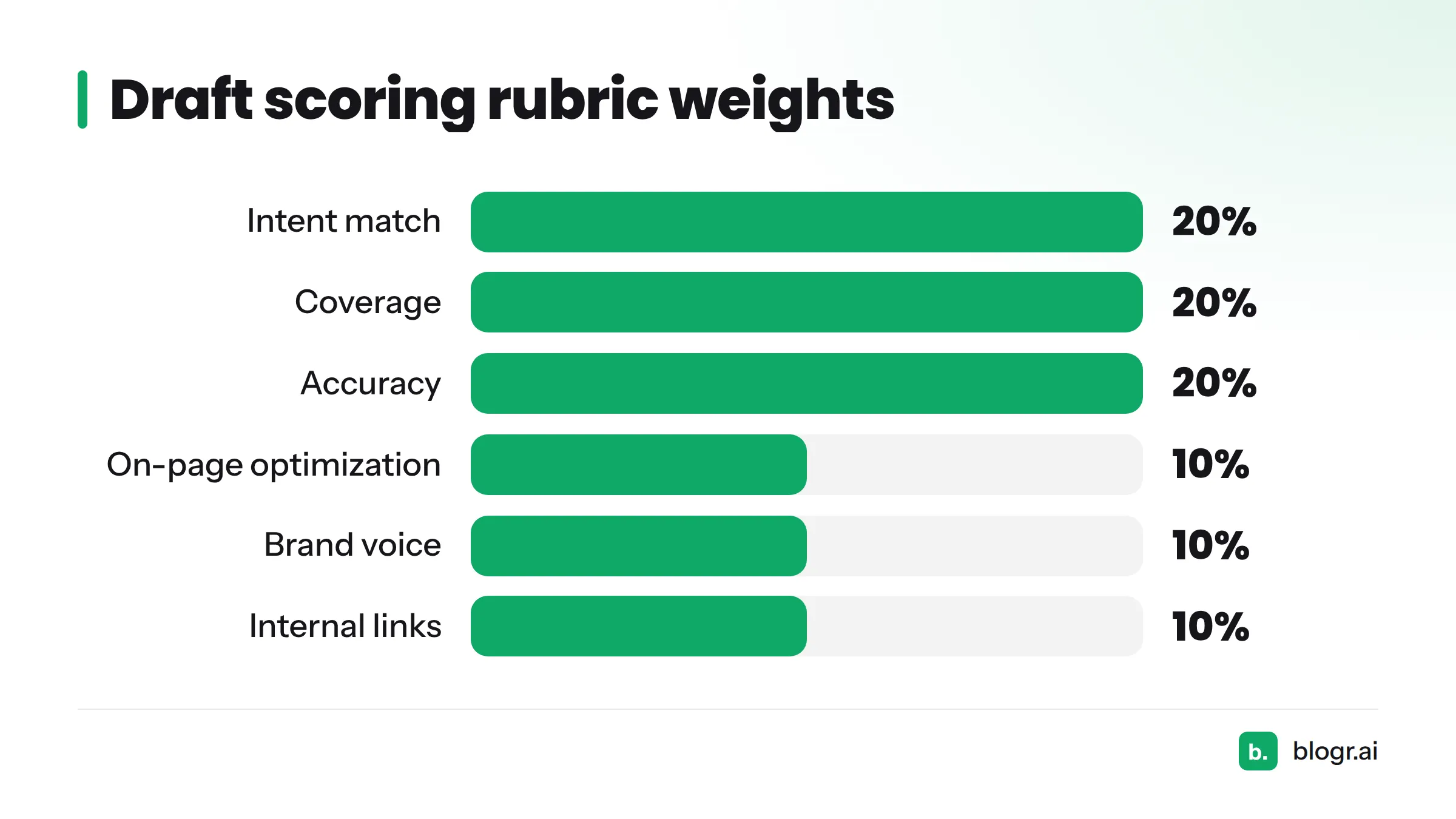
Score each draft from 1 (poor) to 5 (excellent), multiply by the weight, and total it out of 100.
| Criterion | Weight | What a 5 looks like |
|---|---|---|
| Intent match | 20% | Format and angle match what the SERP rewards |
| Coverage | 20% | Hits shared headings, entities and open questions |
| Accuracy | 20% | Every claim checkable; no invented facts |
| On-page optimization | 10% | Title, meta, headings and schema ready |
| Brand voice | 10% | Reads like your site |
| Internal links | 10% | Relevant, real URLs from your site |
| Edit time | 10% | Under 20 minutes to publishable |
Ready-made versions live in the SEO content templates library.
Illustrative example (not measured data): Tool A gives a clean draft but misses the comparison format the SERP wants (intent 2, coverage 3). Tool B gets the format right but invents a statistic (accuracy 1). The rubric makes that trade-off visible instead of leaving it to gut feel.
How many keywords? Test three: one informational, one commercial, one striking-distance query. A single keyword can flatter any tool.
Step 5: Confirm You Can Approve a Draft Before It Publishes
Speed means little if one bad claim goes live. Google's guidance on AI-generated content says generative AI can be useful, but producing many pages without adding value can violate its spam policies. An approval step is your safeguard.
Approval Step vs Autopilot
| Mode | Fits when | Risk |
|---|---|---|
| Approval before publishing | Brand-sensitive, regulated, or new sites | Slower; needs a reviewer |
| Autopilot | Low-risk topics with proven templates and spot checks | Errors reach readers unseen |
We prefer approval first. Loosen it once a tool earns your trust.
What Human Review Must Check
- Every fact and number has a named source.
- The angle matches the search intent.
- No claims you cannot stand behind.
- Brand voice and terminology are right.
- Links point to real, relevant pages.
For wording fixes, our humanizing edits make a good starting set.
Step 6: Check How the Tool Handles Your Site, Voice and Internal Links
A draft that ignores your site is just text.
Brand Voice
Feed the tool two or three of your best posts. Does the next draft borrow your sentence length, terms and stance, or does it sound like every other AI article?
Internal Links and On-Page Work
Good tools suggest internal links from your real URLs, not invented ones. They also produce the title, meta description, heading structure and schema markup. If you do this by hand today, our on-page SEO guide for founders has the checklist.
Publishing and CMS Fit
Look for native CMS integrations with WordPress, Webflow, Shopify and Ghost, or a webhook for custom stacks. Our WordPress integration shows what auto-publishing looks like when it works.
Step 7: Decide, Then Set a Repeatable Review Routine
Break Ties With Your Scores
Add up the rubric totals. If two tools land within five points, break the tie on Step 5 (approval) and Step 2 (demand). Those two matter most for long-term results.
For budgeting, compare each tool's cost per published, edited post rather than the sticker price. You can run our pricing and 7-day free trial through the same rubric.
Review Monthly
Once a month, open Search Console and check positions, impressions and clicks for the posts the tool produced. Our weekly content refresh loop is a ready routine, and it also tells you when a tool is not earning its place.
When to switch type: if your drafts are good but rankings stall, add an optimizer. If you keep re-briefing a general assistant, move to an AI SEO writer. If you publish at scale and review is the bottleneck, tighten approval rules instead of removing them.
Common Problems and How to Fix Them
| Symptom | Likely cause | Fix |
|---|---|---|
| Generic drafts | No brief, or a template brief | Re-run Step 3; add your own examples for voice |
| Off-intent output | Tool never read the SERP | Reject it, or classify intent yourself before drafting |
| Thin coverage | No entity or gap data | Add the missing headings by hand; consider an optimizer |
| Impressions but no clicks | Weak title or meta | See why you rank but get no clicks |
| Rankings slip after a few months | No refresh routine | Run the monthly loop in Step 7 |
Red flags in a free trial: no Search Console connection, outlines that look identical across keywords, invented statistics, and no way to review before publishing.
Frequently Asked Questions
How do you choose AI writing tools for SEO?
Check that the tool starts from Search Console demand, builds a live SERP brief, and supports draft approval. Then run the same keyword through each candidate and score the drafts with a weighted rubric.
Do I need a dedicated SEO tool, or is ChatGPT enough?
ChatGPT handles brainstorming and rewriting well. It doesn't read your Search Console data or the live results unless you supply them. For repeatable ranking work, a dedicated tool removes that manual setup.
Are free AI writing tools good enough for SEO?
They work for experiments and small jobs. Free tiers usually lack a Search Console connection, live briefs and publishing. Use them to learn, then run the Step 4 test before paying for anything.
How should I budget for an AI SEO writing tool?
Divide the monthly price by the number of posts you will realistically publish after editing. That cost per finished post is the fair comparison across tools.
How often should I review results?
Monthly. Check positions, impressions and clicks for each post the tool produced, and refresh the ones that slip.
Does AI content rank?
That question has its own page. Briefly, Google's guidance above says quality and usefulness matter more than how the text was produced.
Next Steps: Test the Method on a Real Keyword
The fastest way to learn is to test. Try blogr.ai's AI SEO writer free for 7 days, connect Search Console, and score its draft with the rubric above next to any other tool. Want the full checklist first? Grab the tool-evaluation templates. More guides wait on the blogr.ai blog.