


Blog Post Examples: 12 Formats With Annotations
Good blog post examples share three traits: a clear job, a format that fits the reader's search intent, and a structure people can scan. This guide annotates 12 common types of blog posts, from how-tos and lists to explainers, comparisons, opinion pieces, case studies, research summaries, and refreshed updates. You will see what each one looks like and when to use it.
I work with SEO content every day at blogr.ai, and one pattern keeps showing up. Writers who struggle usually do not have a writing problem. They picked the wrong shape for the question the reader asked. Let's fix that.
How to use this guide
- Skim the table below to see all 12 formats at once.
- Read the annotation block for any format that fits your topic.
- Jump to the intent matrix and format picker when you are ready to choose.
The 12 Blog Post Formats at a Glance
| # | Format | Best for | Typical intent | Typical structure |
|---|---|---|---|---|
| 1 | Step-by-step guide | Teaching a task | Informational | Goal, steps, result |
| 2 | Walkthrough with screenshots | Software or visual tasks | Informational | Setup, annotated stages, recap |
| 3 | Numbered roundup | Ranking options or ideas | Informational / commercial | Intro, numbered items, pick |
| 4 | Resource collection | Curating tools or links | Informational | Categories, short notes |
| 5 | "What is X" post | Defining a concept | Informational | Definition, parts, examples |
| 6 | Beginner's guide | Broad intro to a topic | Informational | Overview, core concepts, next steps |
| 7 | X vs Y comparison | Choosing between two options | Commercial investigation | Criteria, side-by-side, verdict |
| 8 | Product or tool review | Evaluating one product | Commercial investigation | Summary, tested features, verdict |
| 9 | Thought leadership | Taking a stance | Mixed | Claim, reasoning, counterpoint |
| 10 | Case study | Proving something works | Mixed / commercial | Problem, approach, result |
| 11 | Original research summary | Sharing data | Informational | Method, findings, meaning |
| 12 | Refreshed evergreen update | Keeping a post current | Any | Updated claims, changes, new proof |
Each annotation below uses the same six notes: what it is, typical structure, intent it serves, why it works, what to copy, and what to watch out for. All outlines are illustrative and hypothetical, not real company posts. If you run a shop, an agency, or a local service, treat them as blog post examples for business that you can adapt to your own topics.
What Good Blog Post Examples Have in Common
Before the formats, the shared DNA. Creating helpful, reliable, people-first content, Google Search Central asks whether content gives readers a satisfying, complete answer. Every strong post below does that in its own way.
A single job per post
One post, one promise. A comparison picks a winner. A how-to ends with a finished task. When a post tries to teach, sell, and entertain at once, readers leave unsure what they got.
A headline and intro that match the query
If the query is "what is X," open with the definition. If it is "X vs Y," open with who each option suits. The intro works like a handshake: confirm within a few lines that the reader is in the right place.
Scannable H2 structure
People scan before they read. How Users Read on the Web, Nielsen Norman Group found that most people scan pages rather than read word by word. Descriptive H2s, short paragraphs, and lists respect that habit, which is why every blog post structure example below leans on them.
Proof, specifics, and a next step
Good posts show their work: named tools, real steps, concrete criteria. Then they tell the reader what to do next.
Analysis, not a statistic: When I compare pages that rank for the same query, they tend to share headings and post type. That overlap signals what readers expect, and it is what to copy. It is an observation, not a guarantee of rankings.
How-To and Tutorial Posts (Formats 1-2)
Format 1: Step-by-step guide
- What it is: A post that walks the reader through completing one task in ordered steps.
- Typical structure: One-line outcome, what you need, numbered steps under H2 or H3 headings, a short "what you should see" check, and a next step.
- Intent it serves: Informational ("how to ...").
- Why it works: The reader can verify progress at each step.
- What to copy: Verb-first step headings and a stated result.
- Watch out for: Skipping prerequisites, or burying the answer under backstory.
Illustrative outline: "How to Set Up a Weekly Content Review" with sections for Goal, What You Need, Steps 1 to 5, Common Fixes, and Next Steps.
Format 2: Walkthrough with screenshots
- What it is: A how-to where visuals carry much of the instruction, common in software tutorials.
- Typical structure: Short setup, then one stage per H2 with a visual and a caption, then a recap.
- Intent it serves: Informational, often tool-specific.
- Why it works: Readers can match what they see on screen to your example.
- What to copy: One action per visual, with a caption that names the button or field.
- Watch out for: Outdated interfaces. Screens change, so schedule reviews.
The difference between the two is simple. A step-by-step guide works with text alone. A walkthrough breaks without its visuals. For the full writing process, see our separate guide on writing an SEO blog post.
List and Roundup Posts (Formats 3-4)
Format 3: Numbered roundup
- What it is: A numbered list of options, ideas, or items, each with a short explanation.
- Typical structure: Intro that states the selection criteria, numbered H2 or H3 items, a "how to choose" close.
- Intent it serves: Informational, or commercial when items are products.
- Why it works: The number sets expectations and makes the post easy to scan.
- What to copy: The same mini-structure for every item: what it is, who it suits, one caveat.
- Watch out for: Padding the count to hit a round number.
Illustrative outline: "10 Blog Post Ideas for a Local Bakery" with one idea per H2 and a closing note on picking your first. This is also a handy model for blog post ideas by format: pick the shape first, then fill it with topics.
Format 4: Resource collection
- What it is: A curated, categorized set of tools, templates, or links, kept current over time.
- Typical structure: Intro on who it is for, categories as H2s, one-line notes per resource.
- Intent it serves: Informational, with reference value.
- Why it works: It saves the reader a search. People bookmark it.
- What to copy: Clear categories and honest one-line verdicts.
- Watch out for: Dead links. Check them regularly.
Use a numbered roundup when order or count matters. Use a resource collection when readers will return to find something. We cover how to write list posts well in a separate listicle guide.
Explainer and Definition Posts (Formats 5-6)
Format 5: "What is X" post
- What it is: A post that defines one concept and shows how it works.
- Typical structure: A 40 to 50 word definition up top, why it matters, main parts, a concrete example, related terms.
- Intent it serves: Informational, early in the research process.
- Why it works: The definition-first opening gives search engines and readers a liftable answer.
- What to copy: Plain-English wording and one worked example.
- Watch out for: Jargon that needs its own definition.
This is also the best pick when you want short blog post examples: a tight definition and one example can finish in a few hundred words. For quick term definitions, our SEO glossary follows this exact pattern.
Format 6: Beginner's guide
- What it is: A broad introduction to a topic for someone starting from zero.
- Typical structure: Overview, five to eight core concepts as H2s, common mistakes, a path to next steps.
- Intent it serves: Informational, wider than a single question.
- Why it works: It maps the territory and links out to deeper posts.
- What to copy: A clear "start here" order.
- Watch out for: Trying to cover everything. Link to sub-posts instead.
A "what is X" post answers one question. A beginner's guide answers "where do I begin?" It often works as a pillar page that links to narrower posts, and a topical map helps you plan that cluster.
Comparison and Review Posts (Formats 7-8)
Format 7: X vs Y comparison
- What it is: A head-to-head look at two options against shared criteria.
- Typical structure: Quick verdict, criteria table, a section per criterion, "who should pick which."
- Intent it serves: Commercial investigation.
- Why it works: The reader arrives close to a decision and wants a clear call.
- What to copy: Criteria stated before judgments, and a real verdict.
- Watch out for: Fence-sitting. "It depends" without saying on what is useless.
Format 8: Product or tool review
- What it is: An evaluation of one product based on hands-on use.
- Typical structure: Summary verdict, what it does, tested features, pricing, pros and cons, who it suits.
- Intent it serves: Commercial investigation.
- Why it works: First-hand detail builds trust.
- What to copy: Specific observations from actual use, not feature lists from a sales page.
- Watch out for: Undisclosed bias. State any relationship with the vendor.
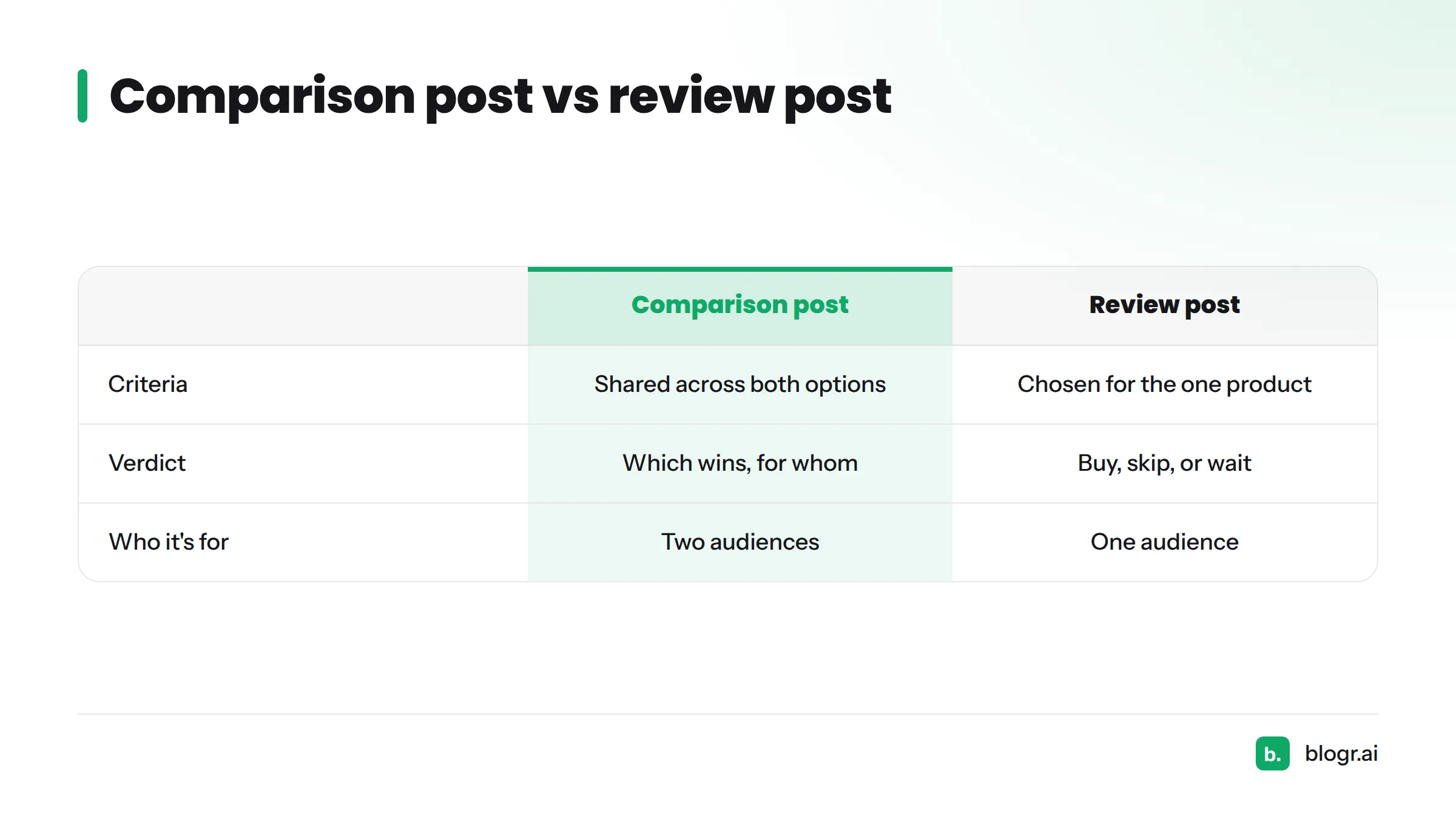
| Anatomy piece | Comparison post | Review post |
|---|---|---|
| Criteria | Shared across both options | Chosen for the one product |
| Verdict | Which wins, for whom | Buy, skip, or wait |
| Who it's for | Two audiences | One audience |
Opinion, Story, and Proof Posts (Formats 9-10)
Format 9: Thought leadership
- What it is: A post that argues a position grounded in your experience.
- Typical structure: Bold claim, why most people believe the opposite, your evidence, a counterpoint, what to do differently.
- Intent it serves: Mixed. It builds trust more than it answers a query.
- Why it works: A clear stance gives readers something to react to and share.
- What to copy: One idea, argued fully.
- Watch out for: Opinion with no evidence. Back every claim with a specific.
Format 10: Case study
- What it is: A story of a problem, the approach taken, and the result.
- Typical structure: Situation, goal, approach in steps, result, lessons, what you would change.
- Intent it serves: Mixed, often late in the buying journey.
- Why it works: Readers see someone like them get an outcome.
- What to copy: The problem, approach, result order, with real context.
- Watch out for: Invented or vague numbers. If you cannot share a figure, describe the change in plain words.
Pair the two for a stronger post: state an opinion, then prove it with a case study.
Data and Update Posts (Formats 11-12)
Format 11: Original research summary
- What it is: A write-up of data you collected or analyzed yourself.
- Typical structure: Headline finding, method, three to five findings with a visual each, what it means, limits.
- Intent it serves: Informational, and it attracts citations.
- Why it works: Nobody else has your data.
- What to copy: Transparent methods and honest limits.
- Watch out for: Overreaching conclusions from a small sample.
Format 12: Refreshed evergreen update
- What it is: An existing post revised so it stays accurate and useful.
- Typical structure: Same URL, updated claims and screenshots, a visible "updated" date, a short note on what changed, new proof added.
- Intent it serves: Whatever the original served.
- Why it works: Readers and search engines both prefer current answers, and you keep the equity of an existing page.
- What to copy: A review rhythm and an honest change note.
- Watch out for: Changing the date without changing the substance.
Here is how to start: update old blog posts in order of how much they have slipped, then set up a weekly content refresh loop so it becomes routine.
Which Format Matches Which Search Intent
Format follows intent. Search intent is the reason behind a query, and each format answers one reason best.
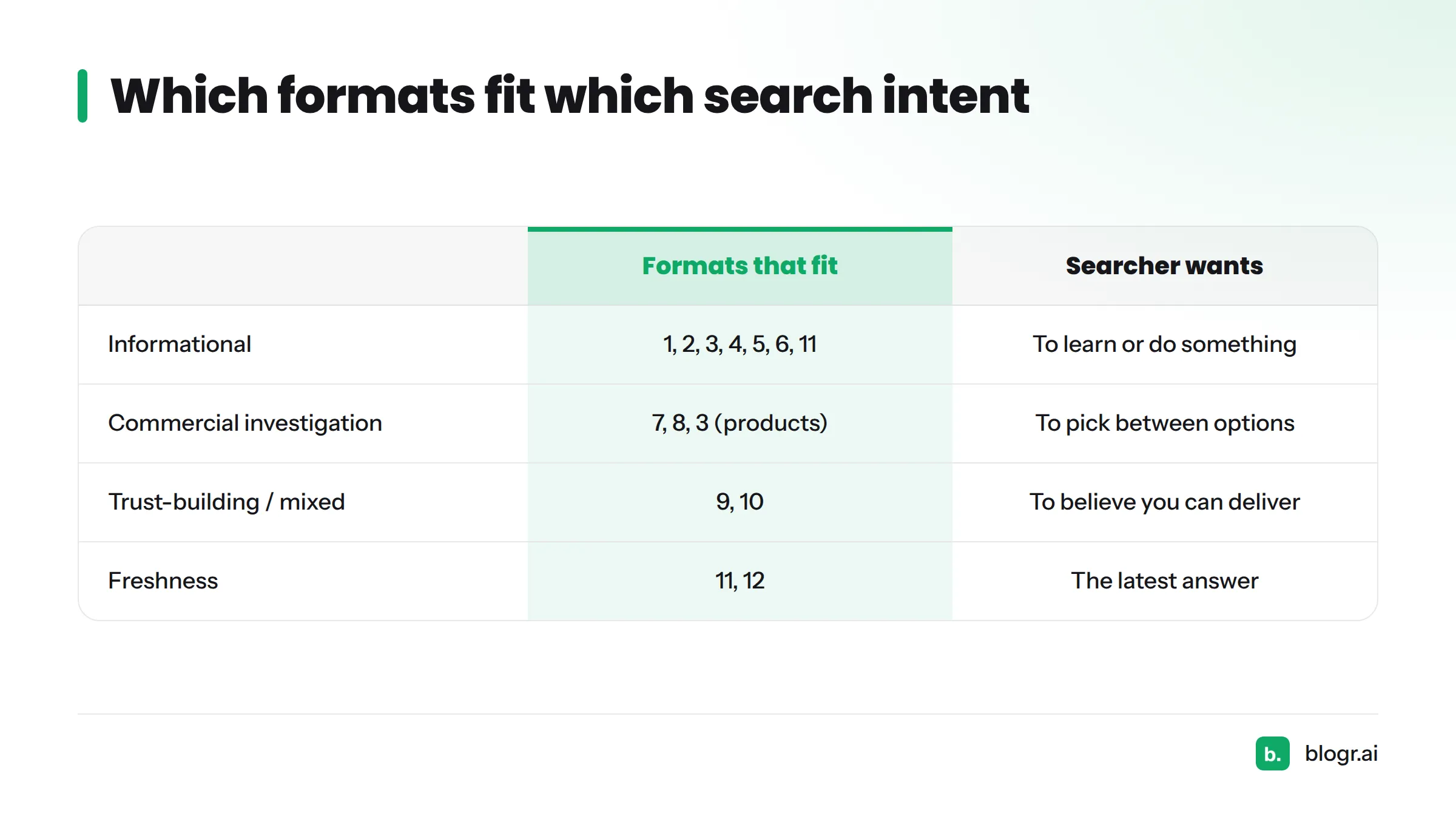
| Intent | What the searcher wants | Formats that fit |
|---|---|---|
| Informational | To learn or do something | 1, 2, 3, 4, 5, 6, 11 |
| Commercial investigation | To pick between options | 7, 8, 3 (when items are products) |
| Trust-building / mixed | To believe you can deliver | 9, 10 |
| Freshness | The latest answer | 11, 12 |
Reading intent from the live SERP
Look at the results page for your keyword. Note the post types (lists, guides, reviews), the headings the top pages share, and the order they use. That pattern shows what searchers appear to expect. Treat it as evidence, not certainty, because rankings depend on many factors.
Doing this by hand for every post is slow. Our live SERP briefs pull shared headings and structure from current results, so your format choice rests on what ranks now.
Decision path:
- Does the searcher want to learn? Pick a how-to, explainer, or list.
- Do they want to compare? Pick X vs Y or a review.
- Do they need to trust you first? Pick a case study or opinion post.
- Do they want fresh data? Pick research or a refreshed update.
How to Choose and Adapt a Format for Your Own Post
A 4-question format picker
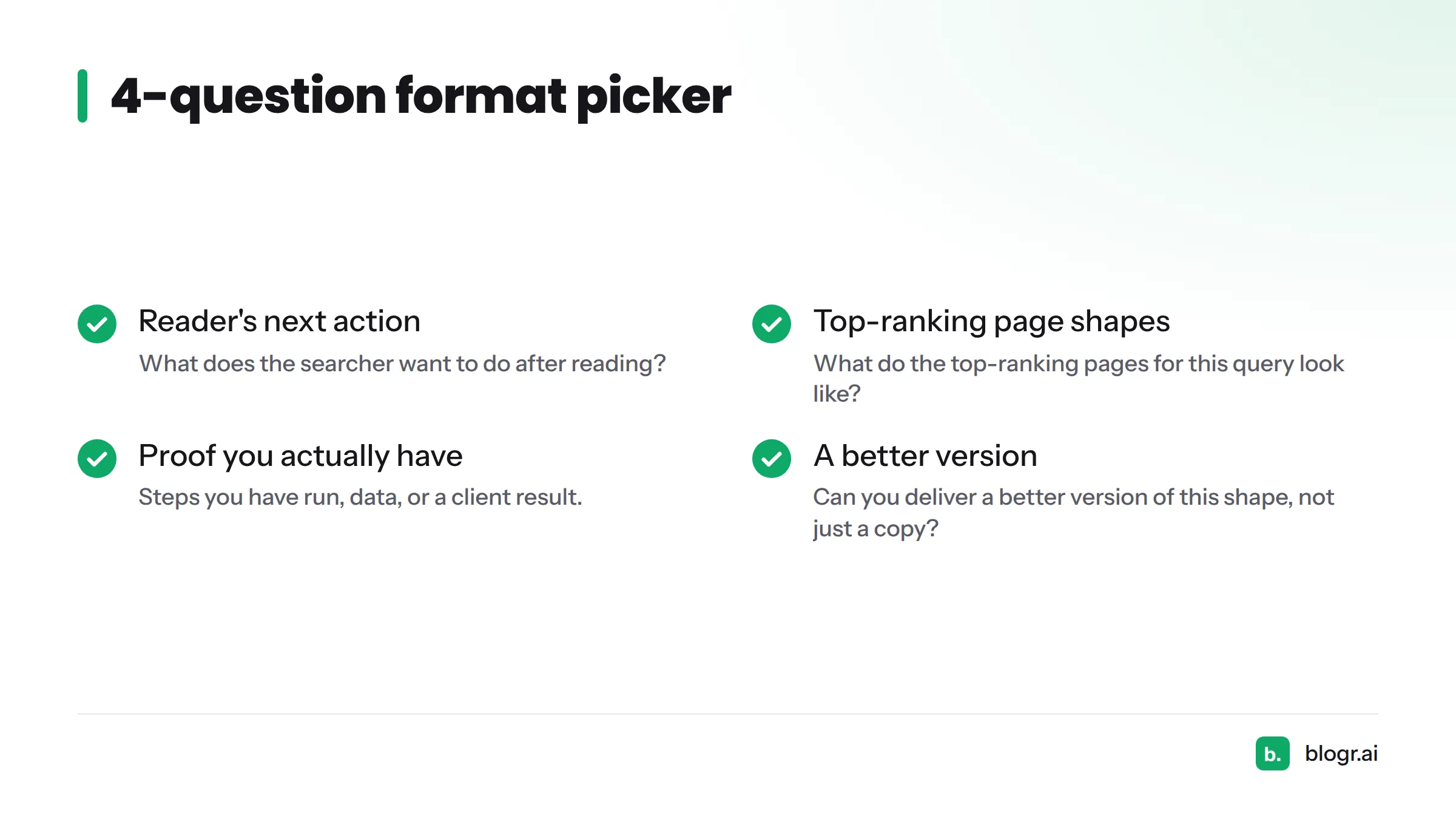
- What does the searcher want to do after reading?
- What do the top-ranking pages for this query look like?
- What proof do I actually have (steps I have run, data, a client result)?
- Can I deliver a better version of this shape, not just a copy?
If you are new to this, I suggest starting with a step-by-step guide or a "what is X" post. Both have a clear finish line, and you can check your work against the query.
Combining formats
Formats mix well. An explainer plus a how-to ("What is a content brief, and how to build one") serves a reader who needs the concept and the task. A case study plus a data summary adds weight to both. Keep one lead format and let the second support it.
Next steps
Grab a blog post template to lock in the structure, then use the AI SEO writer to draft from a live SERP brief. For a broader grounding in on-page choices, our guide to on-page SEO for founders makes a good companion. You can also see how Generative Engine Optimization changes how answer-first formats get picked up.
FAQ
What do you write in a blog post?
You write a focused answer to one reader question: a clear opening, headed sections that deliver the answer or steps, specific proof, and a next step. The format you choose, such as a how-to, comparison, or case study, shapes the sections.
What are the five types of blogs?
Blogs are often grouped by purpose: personal, business, niche or topic, affiliate, and media or news blogs. Post formats are a different cut. A single business blog can publish all 12 formats above.
Are blogs still worth it in 2026?
They can be, when posts match real search needs and stay updated. Results depend on your niche, consistency, and quality, so measure your own traffic and conversions rather than trusting a blanket claim.
What is the 80/20 rule for blogging?
It is a rule of thumb, not a law. One version says to spend about 80 percent of your effort on planning and quality worth promoting and 20 percent on drafting. Another says to publish 80 percent helpful content and 20 percent promotional content. Both circulate, so pick the one that fits your workflow.
How long should a blog post be?
Length should follow the format and the query. A definition post can be short, and a beginner's guide can run long. Check the top results for your keyword and aim to cover the topic more completely, not to hit a word count.
What is the difference between a blog and a blog post?
A blog is the whole site or section where you publish. A blog post is one entry on it, with its own URL, topic, and format.
Sources
- Creating helpful, reliable, people-first content, Google Search Central
- How Users Read on the Web, Nielsen Norman Group
Related: a full sample blog post