


SEO Content Strategy: How to Build One in 2026

An SEO content strategy is a plan for what to publish, in what order, and how to improve it, based on what your audience searches for. Build one by setting goals, researching demand, mapping topic clusters, prioritising with Search Console data, publishing intent-matched pages, then measuring and refreshing.
Most teams write this plan once and file it away. I think that is why so many blogs stall. At blogr.ai, we treat a strategy as a loop you run every week. Here is how to build yours, whether you are a solo founder, an agency, an ecommerce brand or a local business.
The 7 Steps of an SEO Content Strategy at a Glance
An SEO content strategy is a structured plan for choosing, creating, publishing and improving content so it ranks in search and brings in organic traffic. It spans goals, audience, keyword and topic research, topic clusters, prioritisation, intent-matched writing, measurement and refresh. You will also see it called an SEO content plan, a content strategy for SEO, or an organic content strategy. Same idea, different labels.
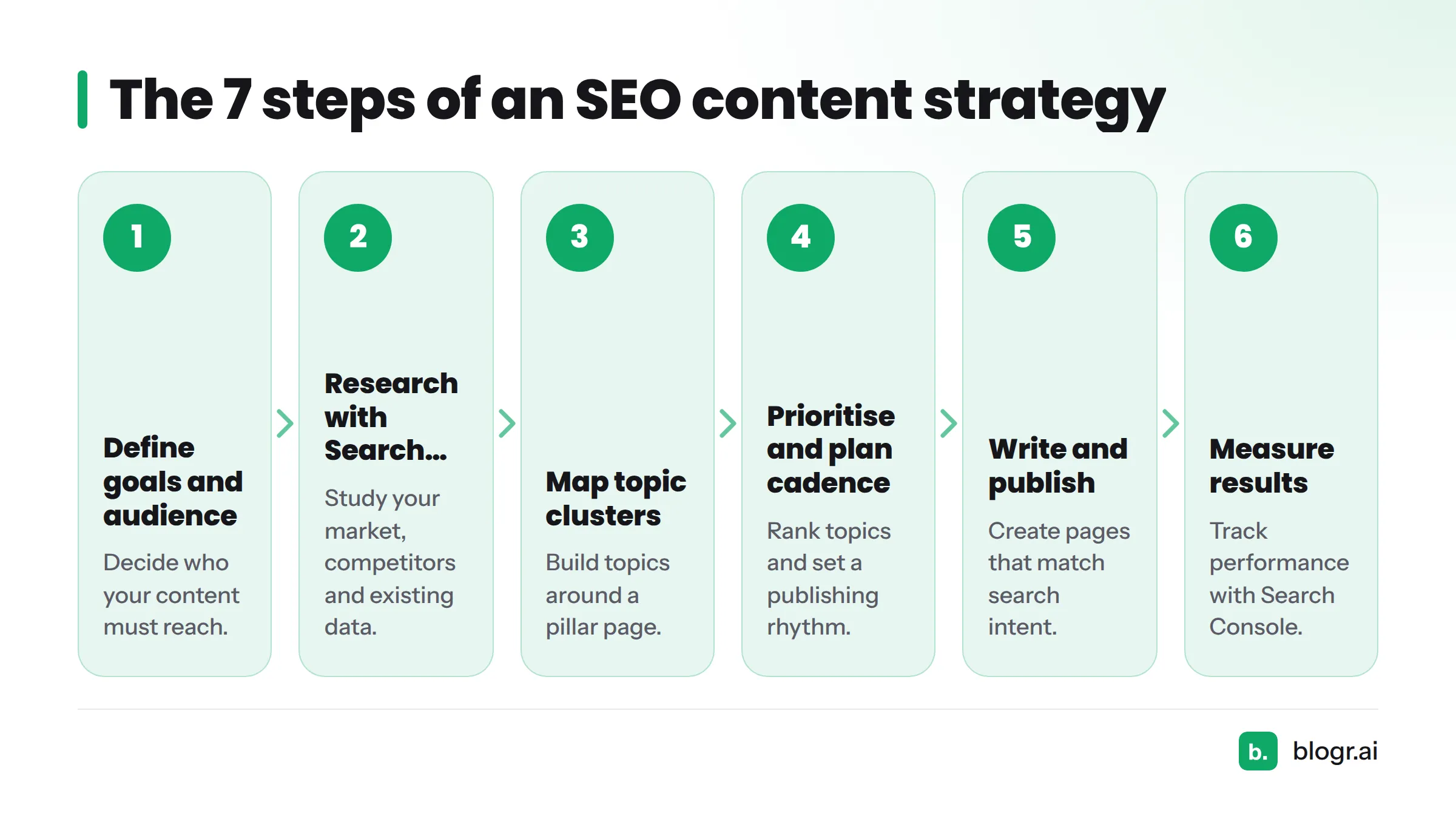
- Define goals and the audience your content must reach.
- Research your market, competitors and existing Search Console data.
- Map topics into clusters around a pillar page.
- Prioritise topics and plan a publishing cadence.
- Write and publish pages that match search intent.
- Measure results with Search Console.
- Improve and repeat the loop.
Picture the steps as a circle: research, plan, write, publish, measure, improve, then back to research. Step 7 feeds new queries straight into Step 2. That return arrow separates a living plan from a spreadsheet nobody opens. It also makes this a practical answer to how to build a content strategy that keeps working after launch week.
Step 1: Define Goals and the Audience Your Content Must Reach
Skip this step and you will publish plenty of pages that rank for nothing useful. Spend an hour here and every later decision gets easier.
Tie content goals to business outcomes
Pick one outcome: signups, demo requests, newsletter subscribers or sales. Then work backwards. If a trial signup is the goal, you need pages that attract people comparing tools or fixing a specific problem, not people hunting for a definition. A content marketing strategy that cannot name its outcome usually ends up measuring traffic and nothing else.
Describe the reader and their search intent in one paragraph
Write who they are, what they are stuck on, and what they type into Google when they are stuck. Search intent usually falls into four buckets: informational, commercial, transactional and navigational. Name the dominant one for your audience.
Deliverable: one line for the goal ("Get 50 trial signups a month from organic search") and one line for the audience ("Founders of small SaaS products with no SEO hire").
Step 2: Start Your Research With Google Search Console Data
Here is where this guide departs from most. Before you brainstorm a single keyword, look at what Google already knows about your site. A Google Search Console content strategy starts with your own reports, not a keyword tool.
Start with the queries you already appear for
Google Search Console reports four numbers for every query and page. Google documents them in its Search Console performance report help.
| Search Console metric | What it tells you |
|---|---|
| Impressions | How often your page showed up in results. This is your demand signal. |
| Clicks | How often people actually visited. |
| CTR | Clicks divided by impressions. It shows how appealing your title and snippet are. |
| Average position | Where you typically rank. Anything between 8 and 15 is a quick-win zone. |
Sort by impressions and look for queries where you sit just off page one. Our guide on how to find keywords in Search Console walks through the exact filters.
Read the pages currently ranking and spot what they miss
Search your target query and open the top five results. Note what they cover, what they skip, and how old they are. Dated pages and thin answers are your openings. Copying what they say gets you nowhere. Filling what they leave out gets you ranked. If you want this done for you, live SERP briefs pull that analysis into each article plan.
No Search Console data yet? Start from competitors and focus topics
A brand-new site has no history, so lean on the search results instead. Pick one narrow subject, list the questions people ask about it, and check which low-competition queries have weak results. Choosing target keywords is its own skill, and a narrow focus beats a broad one when you start from zero. Connect Search Console on day one so data starts collecting.
Deliverable: a list of 20 to 40 candidate queries, each marked with the page that could answer it.
Step 3: Map Topic Clusters Around a Pillar Page
Random posts do not build authority. Connected posts do.
Pillar page and supporting pages
A pillar page covers a broad subject in full. Supporting pages go deep on one narrow question each. A pillar on "SEO content strategy", for instance, might draw support from pages on Search Console keyword research, title tags, content refreshes, topic clusters and measurement.
Internal linking between them
Every supporting page links up to the pillar. The pillar links down to each supporting page. Related supporting pages link sideways. A page with no internal links is an orphan, and crawlers and readers rarely find it. Our guide to on-page SEO for founders covers link placement in plain terms.
How clusters build topical authority
Cover a subject thoroughly, link the pieces together, and search engines see consistent depth. That is the practical meaning of topical authority. The full method lives in our guide on how to create a topical map, and topical map software can generate one from your niche. Start with one cluster of five or six supporting pages rather than ten half-finished ones.
Deliverable: one pillar topic and five to six supporting topics, each with a target query.
Step 4: Prioritise Topics and Plan a Publishing Cadence
You now have more ideas than time. Score them.
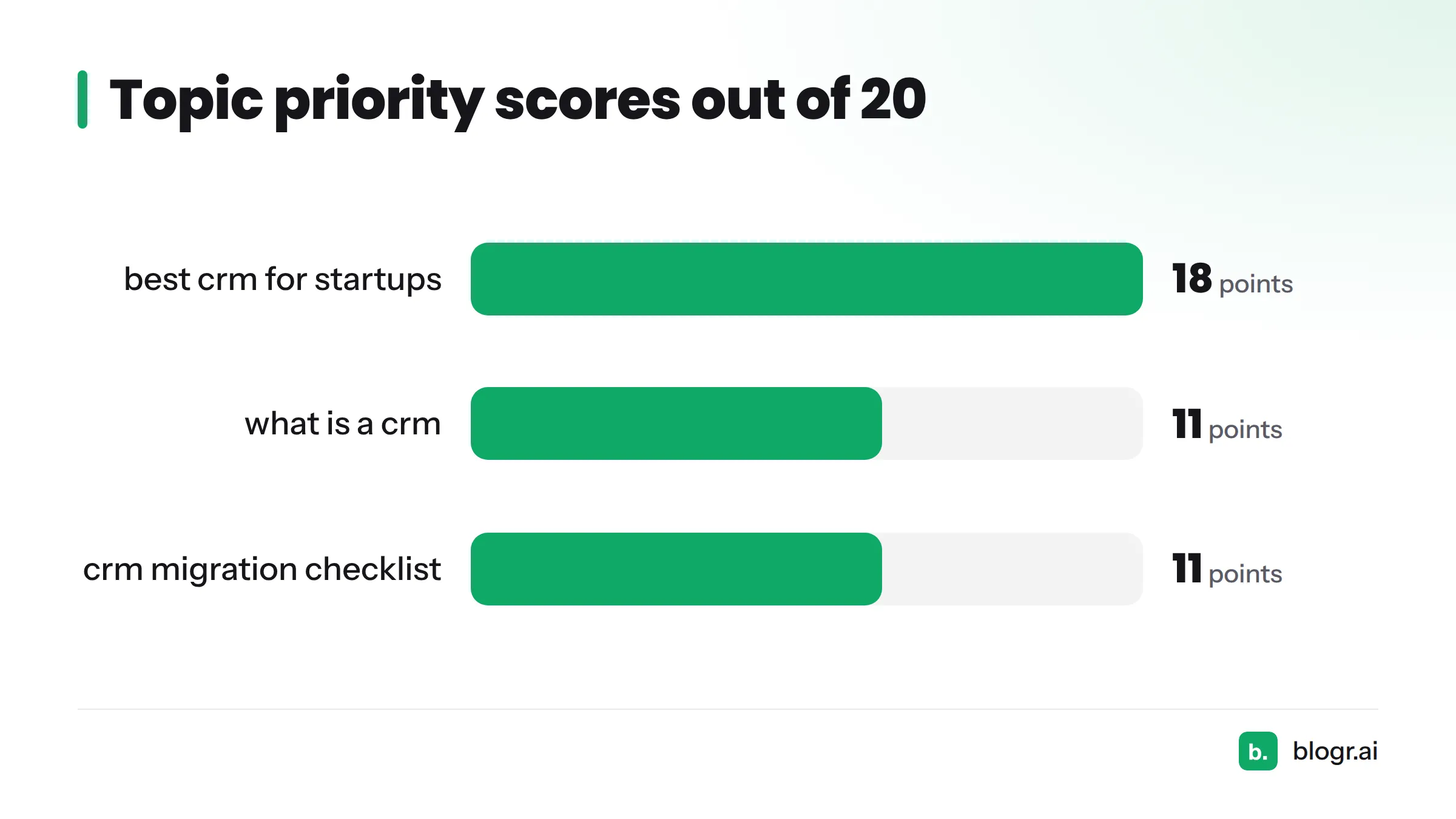
Score topics on demand, distance from page one, business fit and effort
Rate each topic from 1 to 5 on four factors. For effort, a low score means more work. Add them up.
| Topic | Demand | Distance from page one | Business fit | Effort | Total |
|---|---|---|---|---|---|
| "best crm for startups" (existing page, position 12) | 4 | 5 | 5 | 4 | 18 |
| "what is a crm" (new page) | 5 | 1 | 2 | 3 | 11 |
| "crm migration checklist" (new page) | 2 | 2 | 4 | 3 | 11 |
The scores are illustrative, and the scale is a rule of thumb you can adjust. What matters is ranking by evidence, not gut feel.
Quick wins first: queries sitting just off page one
An existing page at position 12 needs a sharper answer, better headings or a few internal links. A brand-new page starts from nothing. Do the quick wins first. They pay back fastest and prove the loop works.
Set a realistic cadence
Pick a pace you can keep for six months. One quality article a week beats seven in week one and nothing in week two. Drip your content out on a steady schedule rather than dumping a batch at once. For a ready-made rhythm, look for a 30-day content plan that spreads one cluster across a month.
Deliverable: a ranked list of topics and a content calendar with dates.
Step 5: Write Pages That Match Search Intent, Then Publish
Match format to intent
Look at what Google already rewards for the query. How-to queries get numbered guides. "Best X" queries get comparisons and lists. Definition queries get short, direct answers, which is why a glossary format suits term-based searches. If the top results are all listicles and you publish an essay, you are fighting the results page.
On-page basics
- A title tag with the main keyword near the front.
- A meta description that promises a specific payoff.
- One H1 and logical H2 and H3 headings.
- Internal links to your pillar and sibling pages.
- Structured data where it fits, following Google's structured data documentation.
Where AI helps and where a human still decides
AI is good at drafts, outlines and structure. A person should still choose the angle, check every fact, and add first-hand experience. Google's guidance on helpful, people-first content asks whether content shows real experience and serves the reader. If your draft sounds generic, our edits for humanising AI content will help.
Pre-publish checklist
- The page answers the query in the first paragraph.
- Format matches what ranks (guide, list, comparison, definition).
- Title and meta description are written and under display limits.
- Two to four internal links go out, and at least one comes in from another page.
- Facts are sourced and claims are specific.
- The page is in your sitemap and submitted for indexing.
Step 6: Measure Results With Search Console
The four numbers
Track impressions, clicks, CTR and average position per page and per query, as in the Step 2 table. Give new pages a few weeks before judging them. Rankings move slowly and then suddenly.
What to check and when
- Weekly: pages gaining impressions, queries entering positions 8 to 15, and any sharp drops.
- Monthly: clicks and CTR by page, plus which cluster is growing fastest.
Our post on turning GSC data into an SEO to-do list shows how to convert these checks into tasks.
Pattern to action
| What you see | What it usually means | What to do |
|---|---|---|
| High impressions, low CTR | People see you but do not click | Rewrite the title and meta description |
| Average position 8 to 15 | Close, but the page is not complete enough | Widen the page: add sections, examples and internal links |
| Clicks falling over several weeks | Content decay or a stronger competitor | Refresh the page with current facts |
| Two pages share the same query | Cannibalisation | Merge them or differentiate their intent |
| Impressions near zero after two months | Low demand or poor indexing | Check indexing, then rethink the topic |
Treat any threshold as a rule of thumb, not a law.
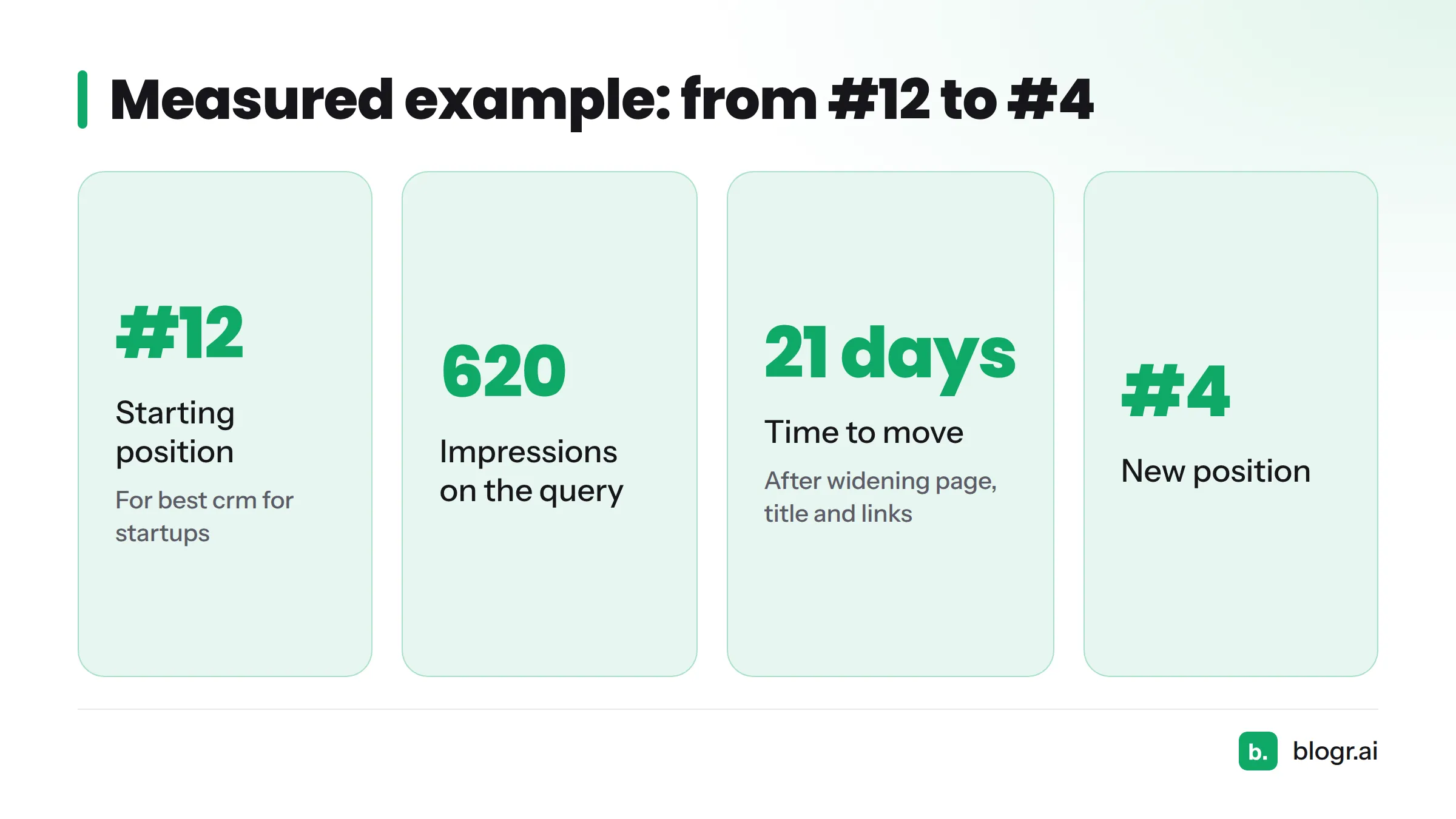
A measured example: one blogr.ai customer had an article ranking at #12 for "best crm for startups." Search Console showed 620 impressions on that query. We widened the page, tightened the title and added internal links. Within 21 days it moved to #4. Luck had nothing to do with it. The data pointed to the page, and the pattern table pointed to the fix.
Step 7: Improve the Content and Repeat the Loop
Refresh, widen, consolidate or retire
Not every page deserves the same fix. Refresh pages that were good and have gone stale. Widen pages that sit close to page one. Consolidate overlapping pages into one stronger page. Retire pages with no demand and no strategic role. Our guide to updating old blog posts covers the editing side.
Feed new queries back into the plan
Search Console keeps surfacing queries you never targeted. Each one is a free topic idea with proof of demand. Add them to your Step 4 scorecard and the loop closes.
Turn the loop into a routine
Block one hour a week. Check Search Console, pick the top two actions, ship them. The weekly content refresh loop lays out that routine, and the content refresh tool builds the action list from your data.
One note on AI search. AI Overviews and AI answer engines change how results appear, but they still draw on well-structured, authoritative pages. Our explainers on Google AI Overview and SEO vs GEO cover the tactics, and the loop above stays the same.
Next steps: if you would rather not run every step by hand, automating the whole content loop is what blogr.ai does, from research to refresh. You can start the 7-day blogr.ai trial and watch the strategy run itself.
Common Mistakes When Building an SEO Content Strategy
- Publishing without a goal. Traffic that never converts is a vanity number.
- Chasing volume over intent. A high-volume keyword with the wrong intent sends visitors who never act.
- Ignoring existing Search Console data. Your best ideas often sit in your own reports.
- Leaving orphan pages. No internal links means little chance of being found or ranked.
- Never refreshing. Content decays, and old pages slip quietly.
- Copying competitors instead of finding their gaps. Match what they cover, then add what they missed.
FAQ
What does SEO mean in content creation?
SEO in content creation means writing and structuring pages so search engines understand them and people searching for that topic find them useful. It covers keyword research, intent matching, clear headings, internal links and ongoing updates.
What should be in a content strategy?
A content strategy should include:
- Business goals and a defined audience
- Keyword and topic research
- Topic clusters around pillar pages
- A prioritised topic list
- A publishing calendar
- On-page standards
- A measurement and refresh process
What is the 80/20 rule of SEO?
The 80/20 rule suggests that roughly 20% of your pages or queries produce about 80% of your results. Find your top-performing pages in Search Console, protect them with regular refreshes, and put new effort where the evidence says it pays back.
What are the top 5 SEO tools?
Google Search Console is free and the best starting point for your own data. Google Analytics covers on-site behaviour. Ahrefs and Semrush handle keyword and backlink research. blogr.ai, an AI SEO writer built around SEO content automation, turns Search Console data and live search-result analysis into planned, published and refreshed content. See our ranked AI SEO writer comparison for more.
How long does an SEO content strategy take to work?
Quick wins on existing pages can move in weeks, as the #12 to #4 example shows. New content usually needs a few months to build traction. Read results as a trend, not a one-week verdict.
How many articles should I publish a month?
Publish the number you can sustain with quality. For most small teams that means four to eight articles a month, with extra time reserved for refreshing existing pages.